
阅读以下说明和Java代码,将应填入(n)处的字句写在答题纸的对应栏内。说明类Queue表示队列,类中的方法如下表所示。类Node表示队列中的元素;类EmptyQueueException 给出了队列操作中的异常处理操作。Java 代码public class TestMain{ // 主类public static void main(String args[]) {Queue q = new Queue();q.enqueue("first!");q.enqueue("second!");q.enqu
题目
阅读以下说明和Java代码,将应填入(n)处的字句写在答题纸的对应栏内。
说明
类Queue表示队列,类中的方法如下表所示。

类Node表示队列中的元素;类EmptyQueueException 给出了队列操作中的异常处理操作。
Java 代码
public class TestMain{ // 主类
public static void main(String args[]) {
Queue q = new Queue();
q.enqueue("first!");
q.enqueue("second!");
q.enqueue("third!");
(1) {
while(true)
System.out.println(q. dequeue());
}
catch((2)) ( }
}
}
public class Queue { // 队列
Node m_FirstNode;
public Queue() { m_FirstNode = null; }
public boolean isEmpty() {
if(m_FirstNode == null) return true;
else return false;
}
public void enqueue(Object newNode) {// 入队操作
Node next = m_FirstNode;
if(next==null) m_FirstNode = new Node(newNode);
else {
while(next.getNext() != null) next = next.getNext();
next.setNext(new Node(newNode));
}
}
public Object dequeue() (3) {// 出队操作
Object node;
if (isEmpty())
(4); // 队列为空,抛出异常
else {
node = m_FirstNode.getObject();
m_FirstNode = m_FirstNode.getNext();
return node;
}
}
}
public class Node { // 队列中的元素
Object m_Data;
Node m_Next;
public Node(Object data) { m_Data = data; m_Next = null; }
public Node(Object data, Node next) { m_Data = data; m_Next = next; }
public void setObject(Object data) { m_Data = data; }
public Object getObject0 { return m_Data; }
public void setNext(Node next) { m_Next = next; }
public Node getNext() { return m_Next; }
}
public class EmptyQueueException extends (5) { // 异常处理类
public EmptyQueueException0 {
System.out.println("队列已空 ! ");
}
}
相似考题
参考答案和解析
(1)try (2)EmptyQueueException e (3)throws EmpbtyQUeUeExCeption (4)throw(new EmptyQueueException()) (5)Exception 解析:本题以队列为例,考查Java的异常处理机制。
异常是指程序执行期间中断指令的正常流程的事件。当一个方法中发生错误时,此方法创建一个对象并将它交给运行时系统,此对象被称为异常对象。它包含关于错误的信息,包括错误的类型和错误发生时程序的状态。创建异常对象并将它交给运行时系统被称为抛出二个异常。
(Java运行时系统要求方法必须捕获或者指定它可以抛出的所有被检查的异常。)
▲捕获。方法可以通过为某类型的异常提供异常处理器来捕获异常。
▲指定。方法通过在它的声明块中使用throws子句(throws异常类型)指定它可以抛出异常。
▲被检查的异常。存在两种异常:运行时异常和非运行时异常。运行时异常在Java运行时系统内发生,如算术异常、指针异常等。方法不必捕获或指定运行时异常。非运行时异常是在Java运行时系统外的代码中发生的异常。编译器确保非运行时异常被捕获或指定,因此它们也被称为“被检查的异常”。
▲方法可以抛出的异常。包括:方法用throw语句直接抛出的任何异常;通过调用另一个方法间接抛出的任何异常。
try块和catch块是异常处理器的两个组件。在try块中产生的异常通常被紧跟其后的catch块指定的处理器捕获:
try{
可能抛出异常的语句
}
catch(异常类型异常引用){
处理异常的语句
}
在选择要抛出的异常的类型时,可以使用其他人编写的异常类,也可以编写自己的异常类。本题中采用自定义的类作为异常的类型。
本题中主类TestMain包含了异常处理机制,用于检测在出队时“队列为空”的错误。根据上面的描述,很容易得出第(1)空应填try。第(2)空应填写对相应异常类型的引用。由程序的注释可以得到,类EmptyQueueException是进行异常处理的类,因此第(2)空应填EmptyQueueException e(e为引用名)。由于异常都是从超类Exception派生而来的,因此第(5)空应填Exception。
由主类TestMain可以看到,在try块的内部并没有给出显示的抛出异常语句,即没有出现throw语句。由此可以得出,在类Queue的方法dequeue中必定要抛出异常。因此首先应指定方法dequeue可以抛出异常,则第(3)空应填throws EmptyQueueException。
由dequeue方法的注释可以看出,第(4)空应该是使用throw语句抛出异常。throw语
句需要—个参数:—个可抛出的对象。因此第(4)空应填throw(newEmptyQueueException())。
更多“阅读以下说明和Java代码,将应填入(n)处的字句写在答题纸的对应栏内。说明类Queue表示队列,类中的方法如下表所示。类Node表示队列中的元素;类EmptyQueueException 给出了队列操作中的异常处理操作。Java 代码public class TestMain{ // 主类public static void main(String args[]) {Queue q = new Queue();q.enqueue("first!");q.enqueue("second!");q.enqu”相关问题
-
第1题:
阅读下列函数说明和Java代码,将应填入(n)处的字句写在对应栏内。
【说明】
类Queue表示队列,类中的方法如下表所示。

类Node表示队列中的元素;类EmptyQueueException给出了队列操作中的异常处理操作。
public class TestMain { //主类
public static viod main (String args[]){
Queue q=new Queue();
q.enqueue("first!");
q.enqueue("second!");
q.enqueue("third!");
(1) {
while(true)
System.out.println(q.dequeue());
}
catch( (2) ){ }
}
public class Queue { //队列
Node m_FirstNode;
public Queue(){m_FirstNode=null;}
public boolean isEmpty(){
if(m_FirstNode==null)return true;
else return false;
}
public viod enqueue(Object newNode) { //入队操作
Node next=m_FirstNode;
if(next==null)m_FirstNode=new Node(newNode);
else{
while(next.getNext()!=null)next=next.getNext();
next.setNext(new node(newNode));
}
}
public Object dequeue() (3) { //出队操作
Object node;
if (isEempty())
(4); //队列为空, 抛出异常
else{
node=m_FirstNode.getObject();
m_FirstNode=m_FirstNode.getNext();
return node;
}
}
}
public class Node{ //队列中的元素
Object m_Data;
Node m_Next;
public Node(Object data) {m_Data=data; m_Next=null;}
public Node(Object data, Node next) {m_Data=data; m_Next=-next;}
public void setObject(Object data) {m_Data=data;}
public Object getObject(Object data) {return m_data;}
public void setNext(Node next) {m_Next=next;}
public Node getNext() {return m_Next;}
}
public class EmptyQueueException extends (5) { //异常处理类
public EmptyQueueException() {
System.out.println("队列已空! ");
}
}
正确答案:(1)try (2)Exception e或者EmptyQueueException e (3)throw EmptyQueueException (4)throw(new EmptyQueueException()) (5)Exception
(1)try (2)Exception e或者EmptyQueueException e (3)throw EmptyQueueException (4)throw(new EmptyQueueException()) (5)Exception 解析:(1)try
从紧随其后的catch可以断定这是异常处理的try-catch结构。
(2)Exception e或者EmptyQueueException e
其中e是对象名,可用任意合法标识符替换,这是catch要捕获的信息。
(3)throw EmptyQueueException
当队列为空时,抛出错误信息EmptyQueueException。
(4)throw(new EmptyQueueException())
当队列为空时,抛出异常。动态生成EmptyQueueException对象,出错处理。
(5)Exception
EmptyQueueException对象是从异常处理类Exception扩展而来。 -
第2题:
阅读以下函数说明和Java代码,将应填入(n)处的字句写在对应栏内。
【说明】
下面的程序先构造Point类,再顺序构造Ball类。由于在类Ball中不能直接存取类Point中的xCoordinate及yCoordinate属性值,Ball中的toString方法调用Point类中的toStrinS方法输出中心点的值。在MovingBsll类的toString方法中,super.toString调用父类Ball的toString方法输出类Ball中声明的属性值。
【Java代码】
//Point.java文件
public class Point{
private double xCoordinate;
private double yCoordinate;
public Point(){}
public Point(double x,double y){
xCoordinate=x;
yCoordinate=y;
}
public String toStrthg(){
return"("+Double.toString(xCoordinate)+","
+Double.toString(yCoordinate)+")";
}
//other methods
}
//Ball.java文件
public class Ball{
private (1);//中心点
private double radius;//半径
private String color;//颜色
public Ball(){}
public Ball(double xValue, double yValue, double r){
//具有中心点及其半径的构造方法
center=(2);//调用类Point中的构造方法
radius=r;
}
public Ball(double xValue, double yValue, double r, String c){
//具有中心点、半径和颜色的构造方法
(3);//调用3个参数的构造方法
color=c;
}
public String toString(){
return "A ball with center"+center.toString()
+",radius "+Double.toString(radius)+",color"+color;
}
//other methods
}
class MovingBall (4) {
private double speed;
public MovingBall(){}
public MoyingBall(double xValue, double yValue, double r, String c, double s){
(5);//调用父类Ball中具有4个参数的构造方法
speed=s;
}
public String toString(){
return super.toString()+",speed"+Double.toString(speed);
}
//other methods
}
public class test{
public static void main(String args[]){
MovingBall mb=new MovingBall(10,20,40,"green",25);
System.out.println(mb);
}
}
正确答案:(1) Point center (2) new Point(xValueyValue) (3) this(xValueyValuer) (4) extends Ball (5) super(xValueyValuerc)
(1) Point center (2) new Point(xValue,yValue) (3) this(xValue,yValue,r) (4) extends Ball (5) super(xValue,yValue,r,c) 解析:在类Ball的有参数构造函数中,对成员变量center通过调用Point类的构造方法初始化,而center在类Ball中尚未声明。结合注释可得空(1)是将center变量声明为Point对象引用,故空(1)应填Point。空(2)是调用Point类的构造函数,根据题意,此处应将xValue和yValue作为参数调用类Point的有参数构造函数,故空(2)应填new Point(xValue,yValue)。
根据注释,空(3)是调用类Ball的有3个参数的构造方法,而其所在方法本身就是类Ball的一个构造方法,因此可用this来调用自身的构造方法,故空(3)应填this(xValue,yValue,r)。
根据题述“在MovingBall类的toString方法中,super.toString调用父类Ball的toString方法输出类Ball中声明的属性值”,可知类MovingBall是类Ball的子类,因此空(4)应填extends Ball。
根据注释,空(5)是调用父类Ball中具有4个参数的构造方法,通过super关键字实现,故空(5)应填super(xValue,yValue,r,c)。 -
第3题:
阅读下列说明、图和Java代码,将应填入(n)处的字句写在对应栏内。
【说明】
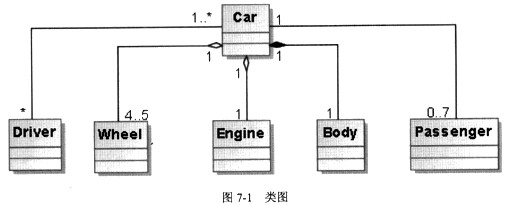
已知对某载客车辆(Car)进行类建模,如图7-1所示,其中类Engine表示发动机引擎,类Wheel表示车轮,类Body表示车身,类Driver表示司机,类Passenger表示乘客。
【Java代码】
class Body{ //此处代码省略 ); //车身类
class Passenger{ //此处代码省略 )/ //乘客类
class Wheel{ //此处代码省略 ); //车轮类
class Driver{ //司机类
public String name; //表示第几路公交车司机
public Driver(String driverName){name = driverName/) //构造函数
};
class Engine{//引擎类
public String engineNo;//引擎编号
public Engine(String engineNo){this.engineNo=engineNo;)//构造函数
};
public class Car{//汽车类
static final int(1)=7; //定义最多载客数
static final int MAX WHEELS =5; //定义最多轮胎数
protected Engine engine;
protected Driver driver;
protected Body body=new Body();
protected Wheel[] wheels;
protected Passenger[]passengers;
public Car(Driver driver){ //构造函数
(2).driver=driver;
engine=new Engine("TX6536型号引擎");
wheels=new Wheel[MAX WHEELS];
passengers=new Passenger[MAX_PASSENGERS];
for(int index=0;index<MAX_WHEELS;index++){
wheels[index]=new Wheel();
}
for(int index=0;index<MAX_PASSENGERS;index++){
passengers[index]=null;
}
}
int getPassengerNumber(){//获取车上乘客数量
//此处代码省略
}
void getOnPassenger(Passenger aPassenger){//乘客上车
//此处代码省略
}
void run(){ //开车
if((3)){System.out.println("司机尚未上车!");return;}
//此处代码省略
}
public static void main(String args[]){
Driver driver=new Driver("第五路公交车司机");
Car car=new Car((4));
for (int index = 0 ; index < MAX_PASSENGERS; index ++)
car.getOnPassenger((5) Passenger());
car.run();
}
}
正确答案:(1)MAX_PASSENGERS (2)this (3)driver==null (4)driver (5)new
(1)MAX_PASSENGERS (2)this (3)driver==null (4)driver (5)new 解析:根据类图描述[分析]可得:一辆汽车可以载0~7名乘客,一辆汽车可以被一个或者多个司机驾驶,并且一辆汽车有4~5个轮胎,一个引擎和一个车框架。程序代码中空(1)处表示一辆汽车最多载客数目,从后面的程序代码[分析]可得,应该填写 MAX PASSENGERS。空(2)处主要设置车的假设司机,由于参数的名称与成员变量的名称相同,因此需要加上this以示区别。空(3)处主要用于判断司机是否上车,因此,代码应该对汽车所维持的司机对象的引用是否为空进行判断。空(4)处用于产生一个汽车对象,所以需要给汽车对象传递合适的参数,构造方法中需要传递一个司机对象,因此应该将driver对象传递到汽车对象中。空(5)处表示乘客上车,getOnPassenger要求传递的是乘客对象,因此空缺处应为构造乘客对象的代码。 -
第4题:
阅读以下说明和JAVA 2代码,填入(n)处的。
[说明]
以下JAVA程序实现了在接口interface iShape2D的定义和应用,仔细阅读代码和相关注释,将程序补充完整。
[代码6-1]
interface iShape2D //定义接口
{
(1)
(2)
}
(3)//实现CRectangle类
{
int width, height;
(4) CRectangle (int w,int h) {
width=w;
height=h;
}
public void area ( ){ //定义area( )的处理方式
System. out.println ("area="+width*height);
}
}
(5)//实现CCircle类
{
double radius;
(6) CCircle (double r) {
radius=r;
}
public void area ( ) { //定义area( )的处理方式
System.out.println ("area="+pi*radius*radius);
}
}
[代码6-2]
public class app10_4
{
public static void main(String args[])
{
CRectangle rect=new CRectangle (5,10);
rect.area ( ); //调用CRectangle类里的area ( ) method
CCircle cir=new CCircle (2.0);
cir.area ( ); //调用CCircl类里的area ( ) method
}
}
正确答案:(1)final double pi=3.14; (2)abstract void area(); (3)class CRectangle implements iShape2D (4)public (5)class CCircle implements iShape2D (6)public
(1)final double pi=3.14; (2)abstract void area(); (3)class CRectangle implements iShape2D (4)public (5)class CCircle implements iShape2D (6)public 解析:本题JAVA程序实现了接口interface iShape2D的定义和应用。(1)和(2)定义pi和面积函数area(),可从下文得到,它们位置可以互换。(3)定义Crectangle,继承iShape2D。(4)应该为public关键字。(5)定义CCircle,继承iShape2D。(6)应该为public关键字。 -
第5题:
阅读以下说明和 Java 代码,填补代码中的空缺,将解答填入答题纸的对应栏内。 【说明】 在股票交易中,股票代理根据客户发出的股票操作指示进行股票的买卖操作。其类图如图 6-1 所示。相应的Java 代码附后。
 图6-1 类图
【 Java 代码】 import java.util.ArrayList; import java.util.List; class Stock { private String name; private int quantity; public Stock(String name ,int quantity) { this.name = name; this.quantity = quantity; } public void buy() { System.out.println("[ 买进]: " + name + ",数量. " + quantity);} public void sell() { System.out.println("[ 卖出]: " + name + ",数量. " + quantity);} } interface Order { void execute(); } class BuyStock (1) Order { private Stock stock; public BuyStock(Stock stock) { (2) = stock; } public void execute() { stock.buy();} } //类SellStock实现和BuyStock 类似,略 class Broker { private List<Order> orderList = new ArrayList<Order>(); public void takeOrder( (3) order) { orderList.add(order); } public void placeOrders() { for ( (4) order : orderList) { order.execute(); } orderList.clear(); } } public class StockCommand { public static void main(String[] args) { Stock aStock = new Stock("股票 A" ,10); Stock bStock = new Stock("股票 B" ,20); Order buyStockOrder = new BuyStock(aStock); Order sellStockOrder = new SellStock(bStock ); Broker broker = new Broker(); broker.takeOrder(buyStockOrder); broker.takeOrder(sellStockOrder); broker. (5) ; } }
正确答案:(1) implements
(2) this.stock
(3) Order
(4) Order
(5) placeOrders()
-
第6题:
阅读以下说明和Java代码,填充程序中的空缺,将解答填入答题纸的对应栏内。
【说明】
某应急交通控制系统(TraficControIS,stem)在红灯时控制各类车辆(Vehicle)的通
行,其类图如图6-1所示,在紧急状态下应急车辆在红灯时可通行,其余车辆按正常规
则通行。

下面的Java代码实现以上设计,请完善其中的空缺。
【Java代码】
abstract class Vehicle
public Vehicle () { }
abstract void run
};
interface Emergency {
(1) ;
(2) ;
}
class Car extends Vehicle {
public Car () { }
void run () { /*代码略*/ }
};
class Truck extends Vehicle {
public Truck () { }
void run () { /*代码略*/ }
class PoliceCar (3)
boolean isEmergency = false;
public PoliceCar () { }
public PoliceCar(boolean b) { this . isEmergency =b; }
public boolean isEmergent () { return (4); }
public void runRedLight () { /*代码略*/ }
}
/*类Ambulance. FireEngine实现代码略*/
public class TraficControISystem {/。交通控制类。/
private Vehicle[ ]V=new Vehiele [24];
int numVehicles;
public void control() {
for (int i=0; i<numVehicles; i++) {
if (v[i] instanceof Enu rgency&& ((Emergency)V [i])
isEmergent()) {
( 5 ) . runRedLigh&39;: ( ) ;
}else
(6).run( )
}
}
void add (Vehicle vehicle) { v[numVehicles++]=vehicle;)/*添加车辆*/
void shutDown()(/*代码略*/}
public static void main (Stri.ng [ ] args) {
TraficControlSystem tcs = new TraficControlSystem() ;
tcs . add (new Car () ;
tcs .add (new PoliceCar () ;
tcs .add (new Ambulance () ;
tcs . add (new Ambulance (true》 ;
tcs . add (new FireEngine ( true》 ;
tcs . add (new Truck () ;
tcs . add (new FireEngine ( ) ;
tcs . control () ;
tcs . shutDown () ;
}
}
正确答案:
本题考查Java语言程序设计的能力,涉及类、对象、方法的定义和相关操作。要求
考生根据给出的案例和执行过程说明,认真阅读理清程序思路,然后完成题目。
根据题目说明,以交通控制系统(Tn.ficControISystem)为背景,本题目中涉及的各
类车辆和是否应急状态下在红灯时的通行情况。根据说明进行设计,题目给出了类图(图
6-1类图所示)。
图中父类Vehicle,代表交通工具,设计为抽象类。在Java用abstract关键字表示,
表示行驶某一个具体的交通工具。Vehick包含一个抽象方法:run(),方法后没有实现,
直接用;来表示抽象方法,表示行驶的方法由具体子类型完成,所以Vehicle的run()为一
个抽象方法:
Abstractvoidrun()
Car和Truck都继承自Vehicle的两个子类型,所以他们都继承了Vehicle的run()方
法,各自行驶方式有所不同,所以都覆盖了Vehicle的run()方法,并加以实现:
voidrun(){/*代码略*/}
Car的两个子类型PoliceCar和Ambuance都继承自Car,从而PoliceCar和Ambulance
也都继承了Car中的run()方法。Truck的子类FireEngine也继承了Truck的run()方法。
图6-1中Emergency在Java中采用接口实现,其中约定红灯时通行的相关接口为:
isEmergent()和runRedLight().
isEmergent()接口约定应急车辆返回自身紧急情况状态,用bool类型的isEmergency
表示:this.isEmergency,其值在紧急情况下为true,非紧急情况下为false。mnRedLight()
接口约定应急车辆在红灯时如何通行(isEmer:;ency为true,则通行,isEmergency为false,
和普通车辆一样通行)。实现Emergency的类有PoliceCar、Ambulance和FireEngine,所
以在这三个类中都要实现Emergency中定义的接口。在Java中,实现接口用implements
关键字,后面加上所要实现的接口,即:
ClassNameimplementsInterfaceName
交通控制类TraficControISystem对运行的交通工具进行控制,所有交通工具用
Vehicle数组v表示;numVehicles表示交通工具数量;control函数进行控制在紧急情况
下应急车辆红灯通行,其他情况按常规通行;add()表示有车辆加入系统,shutDown()表示系统关闭。Vehicle的子类具体类型有Car、71ruck、PoliceCar、Ambulance和FireEngine,
所以v[]数组中对象有这些类型的对象,加入v[]时会自动向上转型成为Vehicle类型,
Emergency接口的应急车辆有runRedLight()方法,其他Car和Truck只有run()方法。因
此,用for循环中对每个v[i],判定是否是Emergency类型的实例,即是否实现了
Emergency。Java中判断一个对象是否是某个类型的实例用instanceof关键字。即:v[i]
instanceofEmergency,如果是,说明是应急车辆,接着判定应急车辆的状态,在判定之
前先要将应急车辆进行向下转型,Java中向]转型直接在对象前加上用括号括起来的转
换的目标类型即可,即:[Emergency)vli]).isEmergent0,如果判定为真,执行
runRedLight(),判定不成功,则调用run(),调用时动态绑定每个数组元素的实际类型,
需要通过动态类型转换并调用runRedLight():
if(v[i]instanceofEmergency&&《Emergency)v[i]).isEmergent()){
((Emergency)v[i]).runRedLight();
}else
V[i]->run();
主控逻辑代码在maln有法中实现。初始化TraficControISystem,用tcs表示,调用
tcs的add()函数添加具体的交通工具,这里会II动向上转型成为Vehicle类型,调用control()
对各车辆进行控制,调用shutDown()系统关自闭
因此,空(1)和空(2)需要定义接口sEmergent0和runRedLight0,题目代码中
已经给出用分号结尾,所以空(1)和空(2)分别为"boolisEmergent()”和“void
runRedLight()”;空(3)需要继承父类Car和实现接口Emergency,Java中继承采用extends
关键字,即应填入“extendsCarimplementsE】aergency”;空(4)要返回应急车辆对象的
状态,即填入“this.isEmergency”;空(5)剑:为动态类型转换后的对象(Emergency)v[il;
空(6)处为普通车辆对象v[i]。
答案
(1)booleanisEmergent()
(2)Voidrunredlight()
(3)extendsCarimplementsEmergency
(4)this.isEmergency
(5)(Emergency)v[i]
(6)v[i]
-
第7题:
试题六(共15分)
阅读以下说明、图和Java代码,填补Java代码中的空缺(1)~(6),将解答写在答题纸的
对应栏内。
【说明】
已知对某几何图形绘制工具进行类建模的结果如图6.1所示,其中Shape为抽象(abstract)类,表示通用图形,Box(矩形)、Ellipse(椭圆)和Line(线条)继承(extends)了Shape类,其中,Circle表示圆(即特殊的椭圆)。
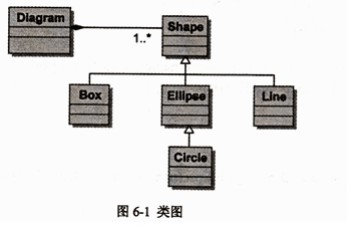
下面的Java代码用于实现图 6-1所给出的设计思路,将其空缺处填充完整并编译运行,输出结果为:
Ellipse
Circle
Ellipse
C
E
【Java代码】
(1) class Shape{
public Shape(String name){
this.name= name;
}
(2) void paint();
String getName(){
retum this.name;
}
final String name;
};
//Box 和Line类似下面 Ellipse,其代码略
class Ellipse (3) {
public Ellipse(String name){
super(name);
System.out.println("Ellipse");
}
Void paintO{∥绘制现状示意代码
System.out.println(getName0);
}
};
class Circle (4) {
public Circle(String name){
super(name);
System.out.println("Circle");
}
};
class Diagram{
private Shape shapes[]= new Shape[2];
public void drawAShape(Shape shape){
shape.paint();
}
void erase A Shape(Shape shape){
∥删除形状,代码略
}
void drawShapes(){
shapes*0+= new Circle("C”);
shapes[l]= new Ellipse("E");
for (int i=O; i<2;++i) {
drawAShap(shapes[i]);//绘制形状
}
}
void close(){
for (int i=0;i<2; ++1) { []关闭图,删除所绘制图形
(5) ;
}
}
public static void main(String[] args){
Diagram diagram= (6) ;
diagram.drawShapes();
diagram.close();
}
}
正确答案:
试题六参考答案(共 15分)
(1) abstract 或public abstract (2 分)
(2) abstract 或public abstract 或protected abstract (2 分)
(3) extends Shape (2分)
(4) extends Ellipse (3 分)
(5) erase A Shape (shapes[i]) (3 分)
(6) new Diagram() (3分) -
第8题:
阅读以下说明和Java程序代码,将应填入(n)处的字句写在答题纸的对应栏内。
【说明】
在下面的Java程序代码中,类SalesTicket能够完成打印票据正文的功能,类 HeadDecorator与FootDecorator分别能够完成打印票据的台头和脚注的功能。
已知该程序运行后的输出结果如下所示,请填补该程序代码中的空缺。
这是票据的台头!
这是票据正文!
-------------------
这是票据的脚注!
这是票据的台头!
这是票据的脚注!
【tava程序代码】
public class SalesTicket {
public void printTicket() {
System. out. println ( "这是票据正文 ! ");
}
}
public class Decorator extends SalesTicket{
SalesTicket ticket;
public Decorator(SalesTicket t) {
ticket = t;
}
public void printTicket(){
if(ticket != null)
ticket.printTicket();
}
public class HeadDecorator extends Decorator{
public HeadDecorator(SalesTicket t) {
(1)
}
public void printTicket() {
System. out.println("这是票据的台头! ");
super.printTicket();
}
}
public class FootDecorator extends Decorator{
public FootDecorator(SalesTicket t) {
(2);
}
public void printTicket() {
super, printTicket ();
System. out.println ("这是票据的脚注!");
}
}
public class Main {
public static void main(String[] args) {
T = new HeadDecorator( (3));
T=(4);
System.out.println("------------------------------------");
T = new FootDecorator((5));
T.printTicket ();
}
}
正确答案:(1)super(t) (2)super(t) (3)new FootDecorator(new SalesTicket()) (4)printTicket() (5)new HeadDecorator(null)
(1)super(t) (2)super(t) (3)new FootDecorator(new SalesTicket()) (4)printTicket() (5)new HeadDecorator(null) 解析:本题中的类HeadDecorator和FootDecorator都继承了Decortator类,因此在构造函数中需要对Decorator类进行初始化,所以空(1)和(2)处应该为super(t)。类Main中空(3)和(4)处程序代码的输出为“这是票据的台头!这是票据正文!这是票据的脚注!”,由于T是一个headDecorator类的实例,因此空(4)处一定是printTicket方法的调用,类headDecorator将输出“这是票据的台头!”后调用其父类的printTicket方法,而仅仅只有FootDecorator类可以输出“这是票据的脚注!”,因此,当前父类的具体实例对象应该为FootDecorator的实例,所以空(3)处应该为new(FootDecorator(new SalesTicket))。空(5)同空(3)原理相同,但由于不需要输出票据的正文,因此在构造HeadDecorator对象的时候其参数为null即可。 -
第9题:
阅读以下说明和Java代码,填充程序中的空缺,将解答填入答题纸的对应栏内。
[说明]
某应急交通控制系统(TraficControlSystem)在红灯时控制各类车辆(Vehicle)的通行,其类图如下图所示,在紧急状态下应急车辆在红灯时可通行,其余车辆按正常规则通行。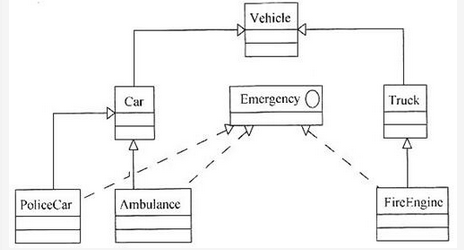
下面的Java代码实现以上设计,请完善其中的空缺。
[Java代码]abstract class Vehicle{public Vehicle(){ }abstract void run();};interface Emergency{ ______; ______;};class Car extends Vehicle{public Car(){ }void run(){ /*代码略*/ }};Class Truck extends Vehicle{public Truck(){ }void run() { /*代码略*/ }};class PoliceCar ______ {boolean isEmergency= false;public PoliceCar(){ }public PoliceCar(boolean b) {this.isEmergency=b; }public boolean isEmergent(){ return ______ }public void runRedLight(){ /*代码略*/ }};/*类Ambulance、FireEngine实现代码略*/public class TraficControlsystem { /*交通控制类*/private Vehicle[]V=new Vehicle[24];int numVehicles;public void control(){for {int i=0; i<numVehicles; i++){if(V[i]instanceof Emergency&&((Emergency)v[i]).isEmergent()){(______).runRedLight();}else______. run();}}void add(Vehicle vehicle){ v[numVehicles++]=vehicle;}/*添加车辆*/void shutDown(){/*代码略*/}public static void main(String[]args){TraficC0ntrolSystem tcs=new TraficControlSystem();tcs.add(new Car());tcs.add(new PoliceCar());tcs.add(new Ambulance());tcs.add(new Ambulance(true));tcs.add(new FireEngine(true));tcs.add(new Truck());tcs.add(new FireEngine());tcs.control();tcs.shutDown();}}答案:解析:boolean isEmergent()
void runRedLight()
extends Car implements Emergency
this.isEmergency
(Emergency)v[i]
v[i] -
第10题:
试题五(共 15 分)阅读以下说明和 Java 程序,填补代码中的空缺,将解答填入答题纸的对应 栏内。【说明】以下 Java 代码实现一个简单的聊天室系统(ChatRoomSystem),多个用 户(User)可以向聊天室( ChatRoom)发送消息,聊天室将消息展示给所有用户。 类图如图 5-1 所示。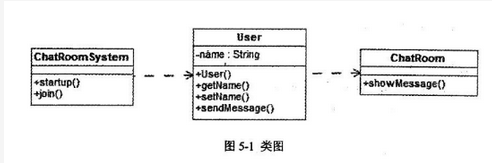
【Java 代码】 class ChatRoom {
public static void showMessage(User user, Strmg message) {System.out.println("[" + user.getName() + "] : " + message);} }classUser{private String name; public String getName() { return name;}public void setName(String name) { this.name = name;}public User(String name) { (1) =name;}public void sendMessage(String message) { (2) (this, message);}}public class Chat:RoomSystem { public void startup() {
User zhang= new User("John");User li =new User("Leo"); zhang.sendMessage("Hi! Leo! "); 1i.sendMessage("Hi! John!"); } public void join(User user) { (3) ("Hello Everyone! I am" + user.getName()); }public static void main(String[] args) { ChatRoomSystem crs= (4) ; Crs.startup();Crs.join( (5) )(“Wayne”));}}/*程序运行结果: [John]:Hi! Leol [Leo]:Hi! John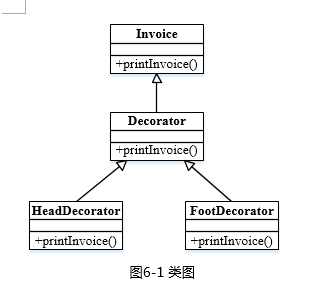
【java代码】
class invoice{
public void printInvoice( ){
System.out.println ( "This is the content of the invoice!");
}
}
class Decorator extends Invoice {
protected Invoice ticket;
public Decorator(lnvoice t){
ticket = t;
}
public
void printInvoice( ){
if(ticket != null)
(1) ;
}
}
class HeadDecorator extends Decorator{
public HeadDecorator(lnvoice t){
super(t);
}
public void printInvoice ( ){
Systent.out.println( "This is the header of the invoice! ");
(2) ;
}
}
class FootDecorator extends Decorator {
public FootDecorator(Invoice t){
super(t);
}
public void printlnvoice( ){
( 3) ;
Systent.out.println( "This is the footnote of the invoice! ");
}
}
Class test {
public static void main(String[] args){
Invoice t =new Invioce( );
Invoice ticket;
ticket= (4) ;
ticket.printInvoice( );
Systent.out.println(“------------------“);
ticket= (5) ;
ticket.printInvoice( );
}
}
程序的输出结果为:
This is the header of the invoice!
This is the content of the invoice!
This is the footnote of the invoice!
----------------------------
This is the header of the invoice!
This is the footnote of the invoice!答案:解析:(1) ticket.printInvoice()
(2) ticket.printInvoice()
(3) ticket.printInvoice()
(4) new FootDecorator(new -
第12题:
阅读下列说明和 Java 代码,将应填入(n)处的字句写在答题纸的对应栏内。
【说明】
生成器( Builder)模式的意图是将一个复杂对象的构建与它的表示分离,使得同样的构建过程可以创建不同的表示。图 6-1 所示为其类图。
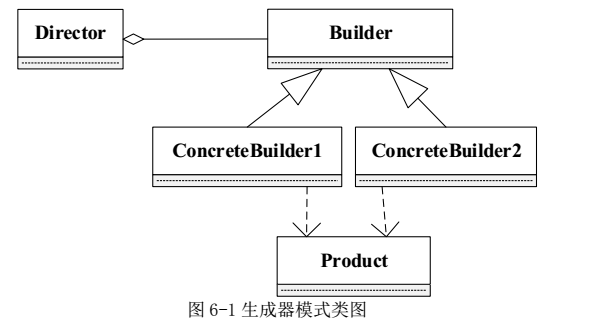
阅读下列说明和C++代码,将应填入(n)处的字句写在答题纸的对应栏内。
【说明】
???? 生成器(Builder)模式的意图是将一个复杂对象的构建与它的表示分离,使得同样的构建过程可以创建不同的表示。图5-1所示为其类图。
?
【C++代码】
#include
#include
using namespace std;
class Product {
private:?
string partA, partB;
public:?
Product() {?? }? ?
void setPartA(const string& s) { PartA = s;}
???? void setPartB(const string& s) { PartB
= s;}? ?
//? 其余代码省略
};
class Builder {
public:? ? ??
(1)??
;?
virtual void buildPartB()=0;? ? ?
(2)??
;
};
class ConcreteBuilder1 : public Builder {
private:?
Product*?? product;
public:
ConcreteBuilder1() {product = new Product();???? }
void buildPartA() {????? (3)???? ("Component
A"); }?
void buildPartB() {????? (4)???? ("Component
B"); }??
Product* getResult() { return product; }
//? 其余代码省略
};
class ConcreteBuilder2 : public Builder {? ??? ? ? ?
/*??? 代码省略??? */
};
class Director {
private:? ??
Builder* builder;
public:??
Director(Builder* pBuilder) { builder= pBuilder;}? ??
void construct() {
????????????????? (5)???? ;
?????????????? //? 其余代码省略? ?
}??
//? 其余代码省略
};
int main() {? ? ??
Director* director1 = new Director(new ConcreteBuilder1());? ?
director1->construct();? ? ??
delete director1;? ? ?
return 0;
【Java代码】
import jav(6)A.util.*;
class Product {? ? ? ?
private String partA;? ? ? ?
private String partB;? ? ? ??
public Product() {}? ? ??
public void setPartA(String s) { partA = s; }? ? ? ?
public void setPartB(String s) { partB = s; }
}
interface Builder {? ?
public?????? (1)???? ;? ??
public void buildPartB();? ? ??
public?????? (2)???? ;
}
class ConcreteBuilder1 implements Builder {? ? ? ?
private Product product;? ? ? ?
public ConcreteBuilder1() { product = new Product();?? }? ? ? ??
public void buildPartA() {????????
(3)??
("Component A"); }
public void buildPartB() {???? ????(4)?? ("Component B"); }? ? ??
public Product getResult() { return product;}
}
class ConcreteBuilder2 implements Builder {?? ? ? ? ?
//? 代码省略
}
class Director {? ? ? ?
private Builder builder;? ? ? ?
public Director(Builder builder) {this.builder = builder; }
public void construct() {
? ? ? ? ? ? ? ? ? (5)???? ;
? ? ? ? ? ? ? //? 代码省略? ? ??
}
}
class Test {? ? ??
public static void main(String[] args) {
???????????????? Director director1 = new
Director(new ConcreteBuilder1());
???????????????? director1.construct();? ? ? ??
}答案:解析:(1)void buildPart A()
(2) Product getResult()
(3)product.setPartA
(4)product.setPartB
(5)builder.buildPartA();
builder.buildPartB();
Product p=builder.getResult(); -
第13题:
阅读以下技术说明和Java代码,将Java程序中(1)~(5)空缺处的语句填写完整。
[说明]
类Queue表示队列,类中的方法如表4-12所示。

类Node表示队列中的元素;类EmptyQueueException给出了队列中的异常处理操作。
[Java代码]
public class testmain { //主类
public static viod main (string args[]) {
Queue q= new Queue;
q.enqueue("first!");
q.enqueue("second!");
q.enqueue("third!");
(1) {
while(true)
system.out.println(q.dequeue());
}
catch( (2) ) { }
}
public class Queue { //队列
node m_firstnode;
public Queue(){m_firstnode=null;}
public boolean isempty() {
if (m_firstnode= =null)
return true;
else
return false;
}
public viod enqueue(object newnode) { //入队操作
node next = m_firstnode;
if (next = = null) m_firstnode=new node(newnode);
else {
while(next.getnext() !=null)
next=next.getnext();
next.setnext(new node(newnode));
}
}
public object dequeue() (3) { //出队操作
object node;
if (is empty())
(4)
else {
node =m_firstnode.getobject();
m_firstnode=m_firstnode.getnext();
return node;
}
}
}
public class node{ //队列中的元素
object m_data;
node m_next;
public node(object data) {m_data=data; m_next=null;}
public node(object data,node next) {m_data=data; m_next=next;}
public void setobject(object data) {m_data=data; }
public object getobject(object data) {return m_data; }
public void setnext(node next) {m_next=next; }
public node getnext() {return m_next; }
}
public class emptyqueueexception extends (5) { //异常处理类
public emptyqueueexception() {
system. out. println ( "队列已空!" );
}
}
正确答案:这是一道要求读者掌握Java异常处理机制的程序分析题。本题的解答思路如下。 异常是指计算机程序执行期间中断的正常流程的事件。例外是在程序运行过程中发生的异常事件比如除0溢出、数组越界、文件找不到等这些事件的发生将阻止程序的正常运行。 当一个方法中发生错误时该方法创建一个对象(该对象称之为异常对象)并将它交给运行时系统。异常对象包含了关于错误的信息即包括错误的类型和错误发生时程序的状态。 “抛出一个异常”是指创建异常对象并将它交给运行时系统。Java的异常处理是通过try、catch、throw、 throws和finally 5个关键字来实现的。这几个关键字的解释如表4-15所示。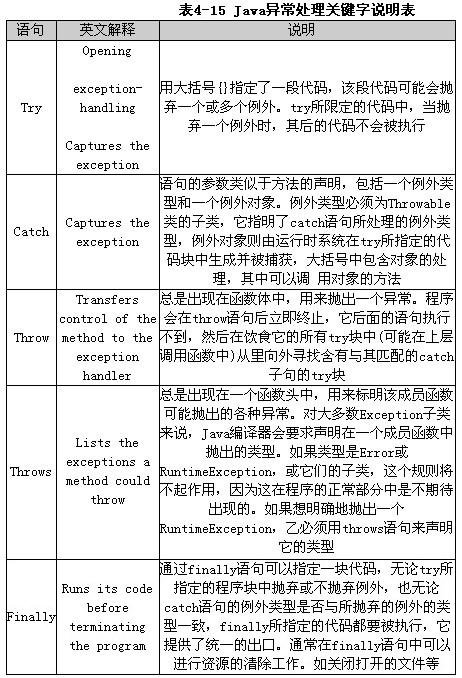 Java运行时系统要求方法必须捕获或者指定它可以抛出的所有被检查的异常如表4-16所示。
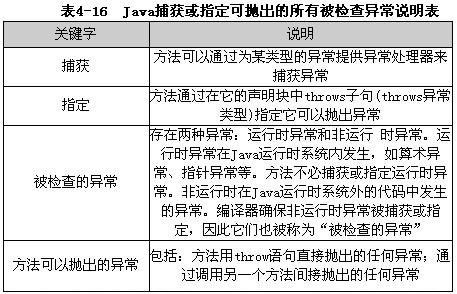 try块和catch块是异常处理器的两个组件。在try块中产生的异常通常被紧跟其后的catch块指定的处理器捕获。
try {
可能抛出异常的语句
}
catch(异常类型 异常引用) {
处理异常的语句
}
catch语句可以有多个分别处理不同类的例外。Java运行时系统从上到下分别对每个catch语句处理的例外类型进行检测直到找到类型相匹配的catch语句为止。其中类型匹配是指catch所处理的例外类型与生成的例外对象的类型完全一致或者是它的父类因此catch语句的排列顺序应该是从特殊到一般。也可以用一个catch语句处理多个例外类型此时它的例外类型参数应该是这几个例外类型的父类程序设计中要根据具体的情况来选择catch语句的例外处理类型。
在选择要抛出的异常的类型时可以使用其他人编写的异常类也可以编写自己的异常类。本试题中采用自定义的类作为异常的类型。
仔细阅读试题中给出的Java源代码可知主类TestMain包含了异常处理机制用于检测在出队时“队列为空”的错误。因此(1)空缺处所填写的内容是“try”。
由catch语句的语法可知(2)空缺处所填写的内容是对相应异常类型的引用。结合试题中给出的关键信息“类EmptyQueueException给出了队列操作中的异常处理操作”即类EmptyQueueException是进行异常处理的类因此(2)空缺处所填写的内容是“EmptyQueueExceptione”或者“Exceptione”其中e是对象名可用任意合法标识符替换。
由于异常都是从超类Exception派生而来的因此(5)空缺处所填写的内容是“Exception”。
仔细阅读主类TestMain程序段可以看到在try块的内部并没有给出显示的抛出异常语句即没有出现throw语句。结合(4)空缺处所在行的注释—“队列为空抛出异常”可以推断在类Queue的方法dequeue中必定要抛出异常。因此(3)空缺处应指定方法dequeue可以抛出异常即所填写的内容是“throws EmptyQueueException”。
(4)空缺处可以使用throw语句抛出异常而使用throw语句时需要一个参数即一个可抛出的对象因此(4)空缺处所填写的内容是“throw(new EmptyQueueException())”。
try块和catch块是异常处理器的两个组件。在try块中产生的异常通常被紧跟其后的catch块指定的处理器捕获。
try {
可能抛出异常的语句
}
catch(异常类型 异常引用) {
处理异常的语句
}
catch语句可以有多个分别处理不同类的例外。Java运行时系统从上到下分别对每个catch语句处理的例外类型进行检测直到找到类型相匹配的catch语句为止。其中类型匹配是指catch所处理的例外类型与生成的例外对象的类型完全一致或者是它的父类因此catch语句的排列顺序应该是从特殊到一般。也可以用一个catch语句处理多个例外类型此时它的例外类型参数应该是这几个例外类型的父类程序设计中要根据具体的情况来选择catch语句的例外处理类型。
在选择要抛出的异常的类型时可以使用其他人编写的异常类也可以编写自己的异常类。本试题中采用自定义的类作为异常的类型。
仔细阅读试题中给出的Java源代码可知主类TestMain包含了异常处理机制用于检测在出队时“队列为空”的错误。因此(1)空缺处所填写的内容是“try”。
由catch语句的语法可知(2)空缺处所填写的内容是对相应异常类型的引用。结合试题中给出的关键信息“类EmptyQueueException给出了队列操作中的异常处理操作”即类EmptyQueueException是进行异常处理的类因此(2)空缺处所填写的内容是“EmptyQueueExceptione”或者“Exceptione”其中e是对象名可用任意合法标识符替换。
由于异常都是从超类Exception派生而来的因此(5)空缺处所填写的内容是“Exception”。
仔细阅读主类TestMain程序段可以看到在try块的内部并没有给出显示的抛出异常语句即没有出现throw语句。结合(4)空缺处所在行的注释—“队列为空抛出异常”可以推断在类Queue的方法dequeue中必定要抛出异常。因此(3)空缺处应指定方法dequeue可以抛出异常即所填写的内容是“throws EmptyQueueException”。
(4)空缺处可以使用throw语句抛出异常而使用throw语句时需要一个参数即一个可抛出的对象因此(4)空缺处所填写的内容是“throw(new EmptyQueueException())”。
这是一道要求读者掌握Java异常处理机制的程序分析题。本题的解答思路如下。 异常是指计算机程序执行期间中断的正常流程的事件。例外是在程序运行过程中发生的异常事件,比如除0溢出、数组越界、文件找不到等,这些事件的发生将阻止程序的正常运行。 当一个方法中发生错误时,该方法创建一个对象(该对象称之为异常对象)并将它交给运行时系统。异常对象包含了关于错误的信息,即包括错误的类型和错误发生时程序的状态。 “抛出一个异常”是指创建异常对象并将它交给运行时系统。Java的异常处理是通过try、catch、throw、 throws和finally 5个关键字来实现的。这几个关键字的解释如表4-15所示。
Java运行时系统要求方法必须捕获或者指定它可以抛出的所有被检查的异常,如表4-16所示。
try块和catch块是异常处理器的两个组件。在try块中产生的异常通常被紧跟其后的catch块指定的处理器捕获。
try {
可能抛出异常的语句
}
catch(异常类型 异常引用) {
处理异常的语句
}
catch语句可以有多个,分别处理不同类的例外。Java运行时系统从上到下分别对每个catch语句处理的例外类型进行检测,直到找到类型相匹配的catch语句为止。其中,类型匹配是指catch所处理的例外类型与生成的例外对象的类型完全一致或者是它的父类,因此,catch语句的排列顺序应该是从特殊到一般。也可以用一个catch语句处理多个例外类型,此时它的例外类型参数应该是这几个例外类型的父类,程序设计中要根据具体的情况来选择catch语句的例外处理类型。
在选择要抛出的异常的类型时,可以使用其他人编写的异常类,也可以编写自己的异常类。本试题中采用自定义的类作为异常的类型。
仔细阅读试题中给出的Java源代码可知,主类TestMain包含了异常处理机制,用于检测在出队时“队列为空”的错误。因此(1)空缺处所填写的内容是“try”。
由catch语句的语法可知,(2)空缺处所填写的内容是对相应异常类型的引用。结合试题中给出的关键信息“类EmptyQueueException给出了队列操作中的异常处理操作”,即类EmptyQueueException是进行异常处理的类,因此(2)空缺处所填写的内容是“EmptyQueueExceptione”,或者“Exceptione”,其中,e是对象名,可用任意合法标识符替换。
由于异常都是从超类Exception派生而来的,因此(5)空缺处所填写的内容是“Exception”。
仔细阅读主类TestMain程序段可以看到,在try块的内部并没有给出显示的抛出异常语句,即没有出现throw语句。结合(4)空缺处所在行的注释—“队列为空,抛出异常”可以推断,在类Queue的方法dequeue中必定要抛出异常。因此(3)空缺处应指定方法dequeue可以抛出异常,即所填写的内容是“throws EmptyQueueException”。
(4)空缺处可以使用throw语句抛出异常,而使用throw语句时需要一个参数,即一个可抛出的对象,因此(4)空缺处所填写的内容是“throw(new EmptyQueueException())”。
-
第14题:
阅读以下说明和Java代码,回答问题1和问题2,将解答填写在对应栏内。
【Java代码】
class usethread implements (1) {
int num
usethread(int n){
num=n;
}
public void (2) {
for(int i=0;i<3;i++)
System.out.println("running:"+num);
System.out.println("finished:"+num);
}
public class multhread{
public static void main(String args[]) (3) InterruptedException{
Thread m1=new Thread(new usethread(1));
Thread m2=new Thread(new usethread(2));
m1.start();
m2.start();
m1.join();
m2.join();
}
}
【问题1】
补充完整上面Java代码中(n)处。
【问题2】
写出上面Java代码运行的结果。
正确答案:(1)Runnable (2)run() (3)throws 程序输出结果: running:1 running:2 running:1 running:2 running:1 running:2 finished:1 finished:2
(1)Runnable (2)run() (3)throws 程序输出结果: running:1 running:2 running:1 running:2 running:1 running:2 finished:1 finished:2 解析:本题考查Java中线程的相关知识。
题目要求按照程序给出的内容来完成填空和输出程序的运行结果。本题的关键是考查我们对线程的了解程度。线程的创建方法有两种,即通过类Thread和接口Runnable创建的方法。刚刚创建的线程还不能与其他的线程并发运行,当调用了方法start后,线程进入就绪态,在被Java虚拟机调度后才进入运行态。进入运行态的线程自动执行成员方法run(),在执行完这个成员方法后线程就又自动进入死亡态。下面来具体分析程序。
第(1)空在定义类usethread语句中,从后面的关键字implements可以推断出类继承了一个接口,而在Java中,接口一般只有成员变量和成员方法的定义而没有成员方法的具体实现。根据后面的程序new Thread(new usethread(1))可以知道创建了线程对象,而这种创建线程对象的方法是通过接口Runnable来实现的,因此类usethread肯定是继承了接口Runnable,所以此空答案为Runnable。
第(2)空是一个函数体的函数名,而函数体的作用是循环进行输出,从上面对线程的分析可以知道,此函数一定是run()函数,因此此空答案为run()。
第(3)空是入口函数后面的语句,结合Java程序的特点,再从此空后面的内容不难推断出,此处是要显式生成异常来处理程序中的异常。而在Java中,一般用关键字throws来显式生成异常,因此此空答案为throws。
对于问题2,我们可以根据程序来分析,程序中创建了两个线程,根据上面的分析我们可以知道,这两个线程都自动调用了函数run(),因此程序输出结果为:
running:1
running:2
running:1
running:2
running:1
running:2
finished:1
finished:2 -
第15题:
阅读以下说明和Java代码,将应填入(n)处的字句写在对应栏内。
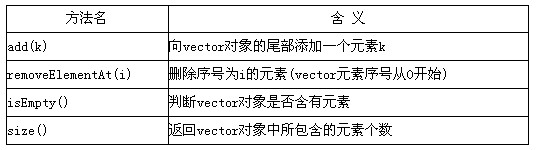
【说明】
java.util库中提供了Vector模板类,可作为动态数组使用,并可容纳任意数据类型。该类的部分方法说明如下表所示:
【Java代码】
import (1);
public class JavaMain {
static private final int (2)= 6;
public static void main(String[] args){
Vector<Integer> theVector = new Vector< (3) >();
// 初始化 theVector, 将theVector的元素设置为0至5
for (int cEachItem = 0; cEachItem < ARRAY_SIZE; cEachItem++)
theVector.add((4));
showVector(theVector); // 依次输出theVector中的元素
theVector.removeElementAt(3);
showVector(theVector);
}
public static void showVector(Vector<Integer> theVector
if (theVector.isEmpty()) {
System.out.println("theVectcr is empty.");
return;
}
for (int loop = 0; loop < theVector.size(); loop++)
System.out.print(theVector.get(loop));
System.out.print(", ");
}
System.out.println();
}
}
该程序运行后的输出结果为:
0,1,2,3,4,5
(5)
正确答案:(1) java.util.Vector或java.util.* (2) ARRAY_SIZE (3) Integer (4) cEachItem (5) 01245
(1) java.util.Vector,或java.util.* (2) ARRAY_SIZE (3) Integer (4) cEachItem (5) 0,1,2,4,5 解析:本题主要考查Java语言的基本使用和类库的应用。
在使用Java库中所提供的类时,一般需要导入该类库所处的包。所以,空(1)需要填入Vector类所在的包。空(2)处主要考查变量在使用前需要先定义的基本概念,后续的代码中使用了ARRAY_SIZE变量,但其使用前没有定义,因此,空(2)处应该为该变量的定义。Java中Vector模板类可存储任意类型,在定义Vector模板类的对象时,需要指定Vector对象的类型。从后面的代码可以看出,Vector被用于存储整型数,所以,空(3)处应填写整型。初始化代码将0到5共6个整数存储到theVector对象中,所以,空(4)处将循环变量的值存入theVector中。程序运行时将首先输出0至5,其次会删除第3个元素,再次输出时将不再包含整数3。 -
第16题:
阅读以下说明和JAVA 2代码,将应填入(n)处的字句写在对应栏内。
[说明]
以下程序为类类型的变量应用实例,通过异常处理检验了类CCircle的变量的合法性,即参数半径应为非负值。仔细阅读代码和相关注释,将程序补充完整。
[JAVA代码]
//定义自己的异常类
class CCircleException extends Exception
{
}
// 定义类 CCircle
class CCircle
{
private double radius;
public void setRadius ( double r ) (1)
{
if ( r<0 ) {
(2)
}
else
(3)
}
Public void show ( ) {
System. out. println ( "area="+3.14*radius*radius );
}
}
public class ciusample
{
public static void main ( String args[] )
{
CCircle cir=new CCircle( );
(4) {
cir. setRadius ( -2.0 )
}
(5)
{
System. out. println ( e+" throwed" ) ;
}
cir. show( ) ;
}
}
正确答案:(1)throws CCircleException (2)throw new CCircleException(); //抛出异常 (3)radius=r; (4)try (5)catch(CCircleException e) //捕捉由setRadius()抛出的异常
(1)throws CCircleException (2)throw new CCircleException(); //抛出异常 (3)radius=r; (4)try (5)catch(CCircleException e) //捕捉由setRadius()抛出的异常 解析:本题主要考查JAVA语言中Class类型的变量应用。本段代码中对于类Ccircle的半径变量进行合法性检验,如果圆Ccircle的半径为负值,则抛出异常处理。 -
第17题:
阅读以下说明和 Java 代码,填补代码中的空缺,将解答填入答题纸的对应栏内。 【说明】 设计 RGB 方式表示颜色的调色板,进行绘图。其类图如图 6-1 所示。该程序的 Java代码附后。
 图6-1 类图
【Java 代码】 //颜色类 class MyColor { private int red ,green, blue; public MyColor( ) { red = o; green = 0; blue = 0; } public MyColor(int red ,int green ,int blue) { this.red = red; this.green = green; this.blue = blue; } //其他方法略 public String toString( ) { return "Red: " + red + "\tGreen: " + green + "\tBlue " + blue; } } //调色板类 class Palette { public int number; / /颜色数 private (1)palette; //颜色表 public Palette( ) { number = 256; palette = new MyColor[number); } public Palette(MyColor[] palette ,int number) { (2)= number; (3)= palette; } //其他方法略 public String toString( ) { String str = ""; for (int i = 0; i < number; i++) { str +=i+ " : " + palette[i] + "\n"; } return str; } //绘图类 class Drawing { public (4) int COLORNUMBER = 16; public static void main(String[] args) { Palette palette; int red ,green ,blue; MyColor[] color = new MyColor[COLORNUMBER]; for (int i = 0; i < COLORNUMBER; i++) { red = (int) (Math.random( ) * 256); green = (int) (Math.random( ) * 256); blue = (int) (Math.random( ) * 256); color [i] = (5) (red ,green ,blue); } palette = new Palette(color ,COLORNUMBER); System.out.println(palette); } }
正确答案:(1) MyColor[]
(2) this.number
(3) this.palette
(4) static final
(5) new MyColor
-
第18题:
试题七(共 15 分)
阅读下列说明、图和Java代码,将应填入 (n) 处的字句写在答题纸的对应栏内。
[说明]
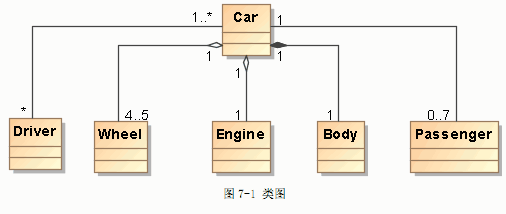
已知对某载客车辆(Car)进行类建模,如图 7-1所示,其中类 Engine 表示发动机引擎,类 Wheel 表示车轮,类 Body 表示车身,类 Driver 表示司机,类 Passenger 表示乘客。
[Java 代码]
class Body{ //此处代码省略 }; //车身类
class Passenger{ //此处代码省略 }; //乘客类
class Wheel{ //此处代码省略 }; //车轮类
class Driver{ //司机类
public String name; //表示第几路公交车司机
public Driver(String driverName){name = driverName;} //构造函数
};
class Engine{ //引擎类
public String engineNo; //引擎编号
public Engine(String engineNo){ this.engineNo = engineNo; } //构造函数
};
public class Car{ //汽车类
static final int (1) = 7; //定义最多载客数
static final int MAX_WHEELS = 5; //定义最多轮胎数
protected Engine engine;
protected Driver driver;
protected Body body = new Body();
protected Wheel[] wheels;
protected Passenger[] passengers;
public Car(Driver driver){ //构造函数
(2) .driver = driver;
engine = new Engine("TX6536 型号引擎");
wheels = new Wheel[MAX_WHEELS];
passengers = new Passenger[MAX_PASSENGERS];
for (int index = 0; index < MAX_WHEELS; index++){
wheels[index] = new Wheel();
}
for (int index = 0; index < MAX_PASSENGERS; index++){
passengers[index] = null;
}
}
int getPassengerNumber(){ //获取车上乘客数量
//此处代码省略
}
void getOnPassenger(Passenger aPassenger ){ //乘客上车
//此处代码省略
}
void run(){ //开车
if( (3) ){ System.out.println("司机尚未上车!"); return;}
//此处代码省略
}
public static void main(String args[]){
Driver driver = new Driver("第五路公交车司机");
Car car = new Car( (4) );
for (int index = 0 ; index < MAX_PASSENGERS; index ++)
car.getOnPassenger( (5) Passenger());
car.run();
}
}
正确答案:
-
第19题:
试题七(共 15 分)
阅读以下说明和 Java 代码,将应填入 (n) 处的字句写在答题纸的对应栏内。
[说明]
java.util 库中提供了 Vector 模板类,可作为动态数组使用,并可容纳任意数据类型。该类的部分方法说明如下表所示:

[Java 代码]
import (1) ;
public class JavaMain {
static private final int (2) = 6;
public static void main(String[] args){
Vector<Integer> theVector = new Vector< (3) >();
// 初始化 theVector,将 theVector的元素设置为 0 至 5
for (int cEachItem = 0; cEachItem < ARRAY_SIZE; cEachItem++)
theVector.add( (4) );
showVector(theVector); // 依次输出 theVector中的元素
theVector.removeElementAt(3);
showVector(theVector);
}
public static void showVector(Vector<Integer> theVector){
if (theVector.isEmpty()) {
System.out.println("theVector is empty.");
return;
}
for (int loop = 0; loop < theVector.size(); loop++) {
System.out.print(theVector.get(loop));
System.out.print(", ");
}
System.out.println();
}
}
该程序运行后的输出结果为:
0, 1, 2, 3, 4, 5
(5)
正确答案: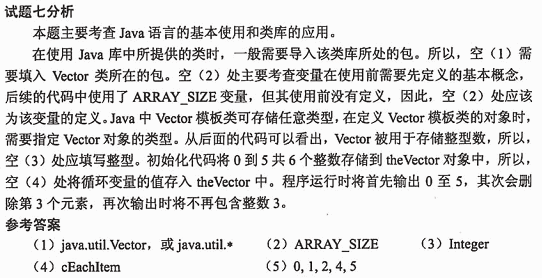
-
第20题:
阅读下列说明和Java代码,将应填入(n)处的字句写在答题纸的对应栏内。 【说明】 某发票(lnvoice)由抬头(Head)部分、正文部分和脚注(Foot)部分构成。现采用装饰(Decorator)模式实现打印发票的功能,得到如图6-1所示的类图。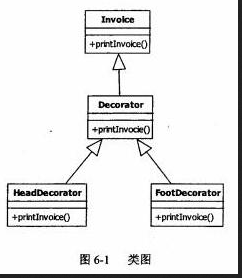
【java代码】 class invoice{ public void printInvoice(){: System.out.println("This is the content of the invoice!"); } } class Decorator:extends Invoice{ protected Invoice ticket; public Decorator(lnvoice t){ ticket=t; } public void printinvoice(){ if(ticket!=NULL) (1); } } class FootDecorator extends Decorator{ public FootDecorator(lnvoice t){ super(t); } public void printinvoice(){ Systent.out.println("This is the header of the invoice!"); (2); } } class FootDecorator extends Decorator{ public FootDecorator(invoice t):{ super(t); } public void printlnvoice(){ (3); Systent.out.println("This is the header of the invoice!"); } } Class test{ public static void main(string[]args){ Invoice t=new invioce(); Invoice ticket; Ticket=(4); Ticket.Printinvoice(); Systent.out.println(“--------------“) Ticket=(5); Ticket.Printinvoice(); } } 程序的输出结果为: This is the header of the invoice! This is the content of the invoice! This is the footnote of the invoice! ---------------------------- This is the header of the invoice! This is the footnote of the invoice!答案:解析:(1) ticket.printInvoice() (2) ticket.printInvoice() (3) ticket.printInvoice() (4) new FootDecorator(new HeadDecorator(t)) (5) new FootDecorator(new HeadDecorator(new Decorator(null)))
【解析】
试题分析
本题考查的是面向对象程序设计和设计模式。本题涉及的设计模式是装饰模式。装饰模式(Decorator) :动态地给一个对象添加一些额外的职责。它提供了用子类打展功能的一个灵活的替代,比派生一个子类更加灵活。
对于程序填空可以参照代码上下文、题干说明和设计模式综合考虑。
对于第(1) 空,是对printInvoice方法的具体调用,在Decorator是 装饰类,继承了Invoice发票类。此处需要填写的是printInvoice方法的方法体,根据Decorator类的上下文,已定义ticket对象,所以此处调用printinvoice方法的是ticket,第(1) 空填写ticket printlnvoice()。
对于第(2) (3) 空,根据类图可知,分别是HeadDecorator抬头 类、FootDecorator脚注类调用printInvoice方法的方法体,由于在这两个类中并没有定义属性,只有借助其超类的构造函数,所以这两个地方调用printlnvoice方法的是它们的超类,即(2) (3) 填写的是super.printInvoice()。
对于第(4) (5) 空,考查的是对装饰模式的调用,都是main函数中实例化的过程,根据输出结果可以看到,第(4)空实例化ticket对象,可以输出抬头、内容、脚注3个部分, 因此需要调用三者的printInvoice()方法, 前面已经实例化了一个Invoice对象t,可以利用给子类实例化,因此第(4) 空填写new HeadDecorator(new FootDecorator());而第(5)空没有输出具体内容,只有抬头和脚注部分,可以看到这里的Invoice对象应该是空,所以第(5) 空填写new HeadDecorator(new FootDecorator(nl)。 -
第21题:
阅读下列说明和Java代码,将应填入(n)处的字句写在答题纸的对应栏内。【说明】某软件公司欲开发一款汽车竞速类游戏,需要模拟长轮胎和短轮胎急刹车时在路面上留 下的不同痕迹,并考虑后续能模拟更多种轮胎急刹车时的痕迹。现采用策略(Strategy)设计模式来实现该需求,所设计的类图如图 5-1 所示。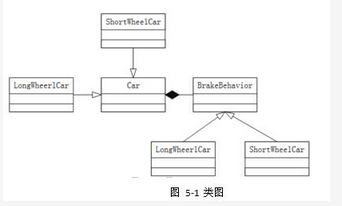
【Java代码】import java.util.*; interface BrakeBehavior{public (1) ;/*其余代码省略*/}class LongWheelBrake implements BrakeBehavior{public void stop(){System.out.println("模拟长轮胎刹车痕迹! ");}/*其余代码省略*/}class ShortWheelBrake implements BrakeBehavior {public void stop(){System.out.println("模拟短轮胎刹车痕迹! ");}/*其余代码省略 */}abstract class Car{protected (2) wheel;public void brake(){ (3) ;}/*其余代码省略*/}class ShortWheelCar extends Car {public ShortWheelCar(BrakeBehavior behavior){(4) ; } /*其余代码省略*/}class StrategyTest{public static void main(String[]args){BrakeBehaviorbrake =new ShortWheelBrake();ShortWheelCar car1= new ShortWheelCar(brake);car1. (5) ;}}答案:解析:1. void stop()2. BrakeBehavior3. wheel.stop()4. wheel=behavior5. brake() -
第22题:
阅读以下说明和Java代码,填补代码中的空缺,将解答填入答题纸的对应栏内。
[说明]
在股票交易中,股票代理根据客户发出的股票操作指示进行股票的买卖操作。其类图如下图所示。相应的Java代码附后。
类图
[Java代码] importJava.util.ArrayList; importjava.util.List; ClaSS Stock{ private Stringname; private intquantity; publicStock(String name,int quantity){ thiS.name=name;this.quantity=quantity; } public void buy(){ System.out.println("[买进]:"+name+",数量:" +quantity);} public void sell(){System.out.println("[卖出]:"+name+",数量:" +quantity);} } interface Order { VOid execute(); } class BuyStock______ Order { private StockStock; publicBuyStock(Stock stock){______=stock; } public voidexecute(){ stock.buy(); } } //类SellStock实现和BuyStock类似,略 clasS Broker{ private List<Order>orderList=new ArrayList<Order>(); Dublic voidtakeOrder(______ Order){ orderList.add(order); } public voidplaceorders(){ for {______order:orderList) {order.execute(); } orderLiSt.clear(); } } public classStockCommand { public static voidmain(String[]args){ Stock aStock:newStock("股票A",10); Stock bStock=newStock("股票B",20); OrderbuyStockorder=new BuyStock(aStock); OrdersellStockOrder=new SellSt0Ck(bStoCk); Broker broker=newBroker(); broker.takeOrder(buyStockorder); broker.takeOrder(sellStockOrder); broker.______; } }答案:解析:implements
this.stock
Order
Order
placeOrders()
【解析】
本题考查Java语言程序设计的能力,涉及类、对象、方法的定义和相关操作。要求考生根据给出的案例和代码说明,认真阅读理清程序思路,然后完成题目。
先考查题目说明,在股票交易中,股票代理根据客户发出的股票操作指示进行股票的买卖操作。根据说明进行设计,题目说明中给出了类图。涉及到股票(Stock)、股票代理(Broker)、股票操作指示(StockCommand)、买卖股票(Order接口、BuyStock与SellStock类)等类以及相关操作。
Stock类定义了两个操作buy()和sell(),分别实现买和卖的操作。在构造函数中接收参数name和quantity,分别表示买卖股票的名称和数量,对当前所创建对象中的name和quantity赋值,用this表示区别当前对象,所以构造器为:
publiC Stock(String name,int quantity) { -
第23题:
阅读下列说明和 C++代码,将应填入(n)处的字句写在答题纸的对应栏内。
【说明】
生成器( Builder)模式的意图是将一个复杂对象的构建与它的表示分离,使得同样的构建过程可以创建不同的表示。图 5-1 所示为其类图。
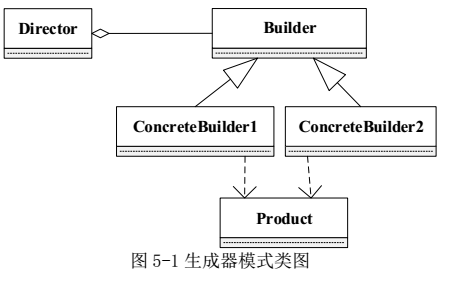
【C++代码】
#include
#include
using namespace std;
class Product {
private:? ??
string partA, partB;
public:
Product() {?? }
? ? ?void
setPartA(const string& s) { PartA = s;}
???? void
setPartB(const string& s) { PartB = s;}
//? 其余代码省略
};
class Builder {
public:
??????? (1)?? ;
virtual void buildPartB()=0;
??????? (2)?? ;
};
class ConcreteBuilder1 : public Builder {
private:
Product*?? product;
public:
ConcreteBuilder1() {product = new Product();???? }
??? void
buildPartA() {????? (3)???? ("Component A"); }
??? void
buildPartB() {????? (4)???? ("Component B"); }
Product* getResult() { return product; }
//? 其余代码省略
};
class ConcreteBuilder2 : public Builder {? ??
/*??? 代码省略??? */
};
class Director {
private:?
Builder* builder;
public:? ?
Director(Builder* pBuilder) { builder= pBuilder;}
???? void
construct() {
? ? ? ? ? ? ? (5)???? ;? ? ?
//? 其余代码省略
????? }
//? 其余代码省略
};
int main() {
Director* director1 = new Director(new ConcreteBuilder1());?
director1->construct();? ?
delete director1;? ??
return 0;答案:解析:(1) virtual void buildPartA() = 0
(2) virtual Product * getResult() = 0
(3) product->setPartA
(4) product->setPartB
(5) builder->buildPartA();
builder->buildPartB();
Product* p = builder->getResult();