
根据网络拓扑和需求说明,完成(或解释)路由器R1的配置。Router(config) ipv6 unicast-routing (3)Rl(config) interface Serial 1/0R1(config-io (4) address (5) (6) (设置串口地址)R1(config-if)no shutdown (开启串口)R1(config)interface FastEthemet0/0R1(config-if) (7) address (8) (设置以太口地址)R1(config-if
题目
根据网络拓扑和需求说明,完成(或解释)路由器R1的配置。
Router(config) ipv6 unicast-routing (3)
Rl(config) interface Serial 1/0
R1(config-io (4) address (5) (6) (设置串口地址)
R1(config-if)no shutdown (开启串口)
R1(config)interface FastEthemet0/0
R1(config-if) (7) address (8) (设置以太口地址)
R1(config-if)exit
(3)
相似考题
参考答案和解析
启动IPV6单播路由配置
更多“根据网络拓扑和需求说明,完成(或解释)路由器R1的配置。 Router(config) ipv6 unicast-routing(3) ”相关问题
-
第1题:
下面是路由器Router3的部分配置信息,请根据路由器Router3的相关配置任务,对(14)、(15)空缺处所在的命令行做出正确的功能解释。
Router3 (config) interface ethernet 0
Router3 (config-if) ip address 192.1.0.130 255.255.255.192
Router3 (config-if) no shutdown
Router3 (config-if) exit
Router3 (config) ip routing
Router3 (config) router ospf 300 (14)
Router3 (config-router) network 192.1.0.128 0.0.0.63 area 1
Router3 (config-router) neighbor 192.1.0.129 (15)
正确答案:(14) 指定使用OSPF协议路由进程ID为300 (15) 指定与该路由器相邻的节点地址为192.1.0.129
(14) 指定使用OSPF协议,路由进程ID为300 (15) 指定与该路由器相邻的节点地址为192.1.0.129 解析:(15)空缺处属于配置命令解释题。其中,“router ospf 300”配置语句用于指定本路由器使用OSPF协议,其路由进程ID为300;“rielghbor 192.1.0.65”配置语句用于声明与该路由器相邻的节点地址为192.1.0.65。
以下是对问题4所给出的配置命令列表的完整解释。
Router3 (config) # interface ethernet 0(进入接口E0的配置模式)
Router3 (config-if) #ip address 192.1.0.130 255.255.255.192(配置该接口IP地址信息192.1.0.130/26)
Router3 (config-if) #no shutdown (激活该端口)
Router3 (config-if) #exit(退出端口配置子模式)
Router3 (config) #ip routing (设置允许本路由器配置IP路由)
Router3 (config) #router ospf 300(指定使用OSPF协议,路由进程ID为300)
Router3 (config-router) #network 192.1.0.128 0.0.0.63 area 1
(指定与该路由器相连的网络IP地址为192.1.0.128,子网掩码的反码为0.0.0.63,网络区域ID号为1)
Router3 (conng-router) #neighbor 192.1.0.129 (指定与该路由器相邻的节点地址为192.1.0.129)
另外,如果读者有兴趣进行本题实验,对于本网络拓扑中路由器Router4的配置命令可参考以下内容。
Router4 (config) # interface ethemet 0 (进入接口E0的配置模式)
Router4 (config-if) #ip address 192.1.0.66 255.255.255.192
(配置该接口IP地址192.1.0.66/26)
Router4 (config-if) # no shutdown(激活该端口)
Router4 (conhg-if) # exlt(退出端口配置子模式)
Router4 (config) # ip routing(设置允许本路由器配置IP路由)
Router4 (config) # router ospf 400 (指定使用OSPF协议,路由进程ID为400)
Router4 (config-router) # network 192.1.0.64 0.0.0.63 area 1
(指定与该路由器相连的网络IP地址为192.1.0.64,子网掩码的反码为0.0.0.63,网络区域ID号为1)
Router4 (config-router) # neighbor 192.1.0.65(指定与该路山器相邻的节点地址为192.1.0.65) -
第2题:
根据网络拓扑和R1的配置,解释并完成路由器R3的部分配置。 R3(config)ctypto isakmp key(7)address(8)
R3(config)crypto transform-set testvpn ah—rod5—hmac esp-des esp-rod5-hmac(9)
R3(cfg—crypto—ttans)exit
R3(config)crypto map test 20 ipsec-isakmp
R3(config—crypto—map)set peer 192.168.1.1
R3(config—crypto—map)set transform-seI(10)
正确答案:(7)378 (8)192.168.1.1 (9)设置IPSec变换集testvpnAH鉴别采用ah-rod5-hmaeESP加密采用esp—desESP认证采用esp-md5-hmac。 (10)testvpn
(7)378 (8)192.168.1.1 (9)设置IPSec变换集testvpn,AH鉴别采用ah-rod5-hmae,ESP加密采用esp—des,ESP认证采用esp-md5-hmac。 (10)testvpn 解析:由R1(config)#crypto isakmp key 378 address 192.168.2.2得(7)(8)题答案。用crypto ipsee transform-set命令配置变换集;例如:crypt。ipsec transform-set transform-set-Dame transforml[transform2[transform3]]。set peer××.××.××.××(指定此VPN链路,对端的IP地址)。routerA(config-crypto-map)#set transform-set test(IPSec传输模式的名字) -
第3题:
分部1的路由器配置为ethemet0/0端口接内部网络,sera10/0端口接外部网络。下列配置指定内外网端口,完成下列配置,将答案填写在答题纸相应的位置。
Router(config) inter eth0/0
Router(config-if) (4)
Router(config-if) inter seria100/0
Router(config-if) (5)
Router(config-if) exit
Router(config)
正确答案:(1)ip nat inside (2)ip nat outside
(1)ip nat inside (2)ip nat outside 解析:本题测试的是路由器端口工作模式的设定方法,根据题目要求路由器配置为 ethernet0/0端口接内部网络,seria10/0端口接外部网络。故配置命令为:
Router(config)#intereth0/0
Router(config-if)# ip nat inside
Router(config-if)#inter seria10/0
Router(config-if)# ip nat outside
Router(config-if)# exit -
第4题:
以下是路由器R1的部分配置,请完成其配置,或解释配置命令含义。
!
R1 (Config) interface fastethernet0
R1(Config-if) ip address (6) (7)
R1(Config-if) (8) (开启端口)
!
R1 (Config) interface serial 0
R1(Config-if) ip address (9) (10)
!
R1 (Config) ip routing
R1 (Config) router rip (11)
R1 (Config-router) (12) (声明网络)
R1 (Config-router) (13) (声明网络)
R1 (Config-router) (14) (声明网络)
R1 (Config-router) version 2 (15)
!
正确答案:(6)192.168.1.1 (7)255.255.255.0 (8)noshutdown (9)192.168.251.1 (10)255.255.255.0 (11)进入RIP配置模式 (12)network 192.168.1.0 (13)network 192.168.251.0 (14)network 192.168.253.0 (15)设置RIP协议版本2 注:(12)、(13)、(14)答案可互换
(6)192.168.1.1 (7)255.255.255.0 (8)noshutdown (9)192.168.251.1 (10)255.255.255.0 (11)进入RIP配置模式 (12)network 192.168.1.0 (13)network 192.168.251.0 (14)network 192.168.253.0 (15)设置RIP协议版本2 注:(12)、(13)、(14)答案可互换 解析:由上图可知,路由器R1的e0的地址为192.168.1.1/24,s0的地址为192.168.251.1/24,使用network命令声明网络,分别是192.168.1.0、192.168.251.0、192.168.253.0。所以其配置应如下。
!
R1(Config)#interface fastethernet0
R1(Config-if) #ip address192.168.1.1255.255.255.0
R1(Config-if)# noshutdown (开启端口),
!
R1(Config)#interface serial 0
R1(Config-if)# ip address 192.168.251.1 255.255.255.0
!
R1(Config)# ip routing
R1 (Config) #router rip(进入RIP配置模式)
R1(Config-router)# network 192.168.1.0(声明网络 192.168.1.0/24)
R1(Config-router)# network 192.168.251.0(声明网络 192.168.251.0/24)
R1(Config-router)# network 192.168.253.0(声明网络 192.168.253. 0/24)
R1(Config-router) #version 2 (设置RIP协议版本2) -
第5题:
阅读以下说明,回答问题1和问题2,将解答填入对应的解答栏内。
【说明】
某单位内部网络拓扑结构如下图所示,在该网络中采用RIP路由协议。

1.路由器第一次设置时,必须通过Console口连接运行终端仿真软件的计算机进行配置,此时终端仿真程序设置的波特率应为(1)b/s。
2.路由器有多种配置模式,请根据以下命令提示状态,判断路由器处于何种配置模式下。
Router(Config) (2)
Router> (3)
Router (4)
Router(Config-if) (5)
正确答案:(1)9600 (2)全局配置模式 (3)用户模式 (4)特权模式 (5)局部配置模式(接口配置模式、端口配置模式)
(1)9600 (2)全局配置模式 (3)用户模式 (4)特权模式 (5)局部配置模式(接口配置模式、端口配置模式) 解析:网络管理员对路由器进行配置时,可以通过以太网口和Console口进行。但是在对路由器进行第一次设置时,必须通过Console口进行。
配置时,通过控制台电缆连接PC的串口和路由器的Console口,在PC上运行终端仿真软件可以连接路由,器,路由器的Console口的默认连接参数如下。
.端口速率:9600b/s:
.数据位:8;
.奇偶校验:无;
.停止位:1;
.流控:无。
在配置PC上运行的终端仿真软件时,应与上述参数匹配,故终端仿真程序设置的波特率应为9600b/s。
路由器的配置操作有三种模式:用户模式、特权模式和配置模式。其中配置模式又分为全局配置模式和接口配置模式、路由配置模式、线路配置模式等子模式。在不同的工作模式下,路由器有不同的命令提示状态。
.Router>: 路由器处于用户模式命令状态。
.Router #: 路由器处于特权模式命令状态。
.Router(Config) #: 路由器处于全局配置模式命令状态。
.Router(Config-if) #: 路由器处于接口配置模式命令状态。
.Router(Config-line) #: 路由器处于线路配置模式命令状态。
.Router(Config-router) #: 路由器处于路由配置模式命令状态。 -
第6题:
【问题2】 (8分)
根据网络拓扑和需求说明,完成(或解释)路由器R1的配置。
R1#configure terminal ;进入全局配置模式
R1(config)# interface ethernet0 :进入端口配置模式
R1(confg-if)# ip address (3) (4) ;配置端口IP地址
R1(config-if)# ipv6 nat ; (5)
R1(config-if)#interface ethernet1
R1(config-if)# ipv6 address (6) /64
R1(config-if)# ipv6 nat
R1(config) #ipv6 access-list ipv6 permit 2001:aaaa::1/64 any ; (7)
R1(config) #ipv6 nat prefix (8)
R1(confg) #ipv6 nat v6v4 pool ipv4-pool (9) (10) prefix-length 24
R1(config) #ipv6 nat v6v4 source list ipv6 pool ipv4-pool
R1(config) #exit
正确答案:【问题2】(8分)
(3)192.17.5.1
(4)255.255.255.0
(5)在接口上启用NAT-PT
(6)2001:aaaa::1
(7)指定IPv6网络中允许被转换的IPv6地址范围
(8) 2001:aaaa:0:0:0:1::/96
(9)16.23.31.10
(10) 16.23.31.20
-
第7题:
某局域网通过两个路由器划分为3个子网,拓扑结构和地址分配如图5-1所示。

下面是路由器R1的配置命令列表,在空白处填写合适的命令/参数,实现R1的正确配置。
Router>en
Router>conf term
Router(config)hostname R1 (1)
R1(config-if)ip address 192.168.1.2 255.255.255.0
R1(config-if)no shutdown
R1(config-if)int s0
R1(config-if)ip address (2)
R1(config-if)no shutdown
R1(config-if)clock rate 56000
R1(config-if)exit
R1(config)ip routing
R1(config)ip route 0.0.0.0 0.0.0.0 (3)
R1(config)ip classless
R1(config)exit
R1copy run start
正确答案:R1(config)#int e0 192.168.2.1 255.255.255.0 192.168.2.2
R1(config)#int e0 192.168.2.1 255.255.255.0 192.168.2.2 -
第8题:
阅读一下说明,回答问题1至问题4.将解答填入答题纸对应的解答栏内。 【说明】 某企业的内部子网1和内部子网2通过路由器R1与Internet互联,企业内部网络之间的互访要求采用RIP路由协议,对外的Internet接入要求采用静态路由协议,该企业网络结构和IP地址分配如图3-1所示。

【问题1】(5分) 在对路由器进行首次设置时,通过Console端口进行连接,客户机系统为Windows XP,运行的终端仿真程序为超级终端,出现如图3-2所示的针对串口通信参数的设置,请给出正确的参数设置,以便进入路由器开始设置。 每秒位数(1),数据位(2),奇偶校验(3),停止位(4),数据流控制(5)。 (1)-(5)备选答案: A.115200 B.9600 C.4800 D.8 E.2 F.1 G.无 H.有 I.硬件 J.Xon/Xoff

【问题2】(5分) 下面是路由器R1的基本配置信息,根据图3-1中拓扑信息,按照题目要求完成配置命令。 Router>enable Routerconfigure terminal Router(config)hostname(6) //给路由器更改名称 R1(config)interface F0/0 R1(config-if)ip addr (7) //为F0/0接口配置IP地址 R1(config-if)(8)//激活端口 R1(config-if)interface(9) R1(config-if) ip addr(10)//为F0/1接口配置IP地址 【问题3】(6分) 根据科目要求,该企业通过RIP路由协议完成子网之间的互访,同时使用静态路由接入互联网,根据图3-1中拓扑信息,根据题目要求完成路由器R1的配置命令。 …… R1(config)interface S0 R1(config-if)ip addr (11) //为S0接口配置IP地址 R1(config-if)no shutdown R1(config-if)exit R1(config)ip route (12)//配置默认路由 R1(config)(13) R1(config-router)network(14)//配置子网1参与RIP R1(config-router)network(15)//配置子网2参与RIP R1(config-router) (16)//退出至特权模式 R1 …….
【问题4】(4分) RIP路由协议中,最大的跳数为(17),一旦超过,则意味着路径不可达。在RIP配置模式下,使用命令distance制定一个管理距离值,其有效的管理距离值为0-255,其中RIP的默认管理距离值为(18)。
正确答案:【问题1】(5分)
(1)B
(2)D
(3)G
(4)F
(5)G
【问题2】(5分)
(6)R1
(7)10.10.10.1 255.255.255.0
(8)no shutdown
(9)f0/1
(10)10.10.11.1 255.255.255.0
【问题3】(6分)
(11)61.150.1.2 255.255.255.252
(12)0.0.0.0 0.0.0.0 61.150.1.1
(13)router rip
(14)10.10.10.0
(15)10.10.11.0
(16)end
【问题4】(4分)
(17)15
(18)120
-
第9题:
试题五(共15分)
阅读以下说明,回答问题1至问题2,将解答填入答题纸对应的解答栏内。
【说明】
某公司总部内采用RIP协议,网络拓扑结构如图5-1所示。根据业务需求,公司总部的192.168.40.0/24网段与分公司192.168.100.0/24网段通过VPN实现互联。
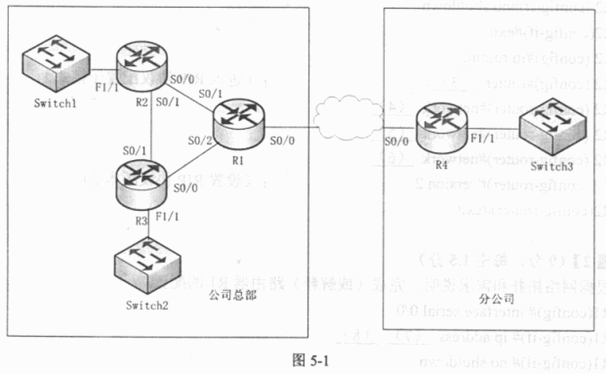
在网络拓扑图中的路由器各接口地址如表5-1所示:
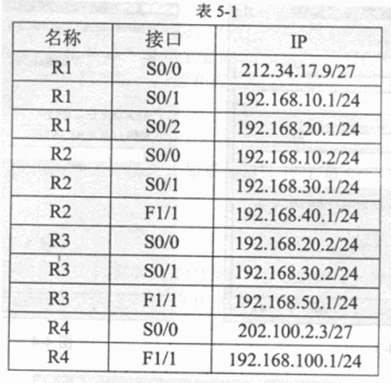
【问题1】(6分,每空1分)
根据网络拓扑和需求说明,完成路由器R2的配置:
R2config t
R2 (config)interface seria1 0/0
R2 (config-if)ip address (1) (2)
R2 (config-if)no shutdown
R2(config-if)exit
R2 (config)ip routing
R2(config)router(3) ;(进入RIP协议配置子模式)
R2 (config-router)network (4)
R2 (config-router)network (5)
R2 (config-router)network (6)
R2 (config-router)version 2 :(设置RIP协议版本2)
R2(config-router)exit
【问题2】(9分,每空1.5分)
根据网络拓扑和需求说明,完成(或解释)路由器R1的配置。
Rl(config) interface seria1 0/0
Rl(config-if) ip address (7) (8)
Rl(config-if) no shutdown
Rl(config)ip route 192.168.100.0 0.0.0.255 202.100.2.3 ;(9)
Rl(config)crypto isakmp policy 1
Rl (config-isakmp)authentication pre-share ;(1 0)
Rl(config-isakmp)encryption 3des ;加密使用3DES算法
Rl(config-isakmp)hash md5 ;定义MD5算法
Rl(config)crypto isakmp key test123 address (11) ;设置密钥为test123和对端地址
Rl(config)crypto isakmp transform-set link ah-md5-h esp-3des;指定VPN的加密和认证算法。
Rl(config)accress-list 300 permit ip 192.168.100.0 0.0.0.255 ;配置ACL
Rl(config)crypto map vpntest 1 ipsec-isakmp ;创建crypto map名字为vpntest
Rl(config-crypto-map)set peer 202.100.2.3 ;指定链路对端lP地址
Rl(config-crypto-map)set transfrom-set link ;指定传输模式link
Rl(config-crypto-map)match address 300 ;指定应用访控列表
Rl(config) interface seria10/0
Rl(config)crypto map(12) ;应用到接口
正确答案:【问题1】(6分)
(1) 192.168.10.2
(2) 255.255.255.0
(3) RIP
(4) 192.168.10.0
(5) 192.168.20.0
(6) 192.168.30.0
【问题2】(9分)
(7) 212.34.17.9
(8) 255.255.255.224
(9)配置静态路由(指向VPN的对端)
(10)定义预共享密钥
(11) 202.100.2.3
(12) vpntest -
第10题:
根据网络拓扑和需求说明,完成路由器R1的配置。
R1 (config)# interface Serial 1/0
R1 (config-if)# ip address (3) 255.255.255..0 (设置串口地垃)
R1 (config-if) #no shutdown (开高串口)
R1 (config) #interface FastEthernet0/0
R1 (config-if) #ip address (4) 255.255.255.0 (设置以太口地址)
R1(config-if)#exit
R1(config)#router ospf 1
R1(config-router)#network 192.0.0.1 (5) area 0
R1(config-router)#network 192.1.1.1 (6) area 0
(3)
正确答案:192.1.1.1
192.1.1.1 -
第11题:
某单位的办公网和商务网通过路由器R1、R2、R3与Internet相连,网络连接和IP地址分配如图1所示。该单位要求通过RIP路由协议使办公网和商务网之间能够互相通信,并正常访问Internet
请阅读以下R1的配置信息,并补充【6】~【10】空白处的配置命令或参数。按题目要求完成R1的正确配置。

Router>enable
Router
Routerconfigure terminal
Router(config)
Router(config)hostname R1
R1(config)interface f0/1
R1(config-if)ip address 202.206.16.1 255.255.255.0
R1(config-if)no shutdown
R1(config-if)interfacef0/2
R1(config-if)ip adress 202.206.17.1 255.255.255.0
R1(config-if)no shutdown
R1(config-if)exit
R1(config)
R1(config)interface s1
R1(config-if)vlan ip adress 202.112.41.144 255.255.255.252
R1(config-if)bandwidth 【6】 配置带宽为2.048Mbps
R1(config-if)【7】 PPP 封装PPP协议
R1(config-if)noshutdown
R1(config-if)exit
R1(config-if)iproute 【8】 配置缺省路由
R1(config-if)router rip
R1(config-router)network 【9】 配置参与RIP的网络
R1(config-router)network 【10】 配置参与RIP的网络
R1(config-router)end
R1write
R1
正确答案:
答案:【6】2048【7】encapsulation【8】0.0.0.00.0.0.0202.112.41.143【9】202.206.16.0【10】202.206.17.0 -
第12题:
根据网络拓扑和要求说明,完成(或解释)路由器R1 的配置: R1#config R1(config)# interface FastEthernet 0/1 R1(config-if)#ip address (1) (2) R1(config-if)#no shutdown R1(config-if)#exit R1(config)#ip dhcp pool vlan 3 R1(dhcp-config)#network 192.168.3.0 255.255.255.0 R1(dhcp-config)#default-router 192.168.3.254 255.255.255.0 ; (3) R1(dhcp-config)#dns-server 192.168.2.1 ; (4) R1(dhcp-config)#lease 0 8 0 ; (5) R1(dhcp-config)#exit R1(config)#ip dhcp pool vlan 4 R1(dhcp-config)#network (6) (7) R1(dhcp-config)#default-router 192.168.4.254 255.255.255.0 R1(dhcp-config)#dns-server 192.168.2.1 R1(dhcp-config)#lease 0 8 0 R1(dhcp-config)#exit R1(config)#ip dhcp excluded-address (8) (9) R1(config)#ip dhcp excluded-address 192.168.3.254 //排除掉不能分配的IP 地址 R1(config)#ip dhcp excluded-address 192.168.4.254 R1(config)# (10) 192.168.3.0 255.255.255.0 FastEthernet0/1 //在以太网接口和VLAN3 间建立一条静态路由
正确答案: (1)192.168.1.1、
(2)255.255.255.0、
(3)设置部门2 网关为192.168.3.254、
(4)设置部门2DNS 服务器地址为192.168.2. 1、
(5)设置DHCP 租期为8 小时、
(6)192.168.4.0、
(7)255.255.255.0、
(8)192.168.3.1、
(9)192.168.3.10、
(10)ip route -
第13题:
根据网络拓扑和需求说明,解释路由器R2的GRE隧道配置。
……
R2(config)interface tunnel 0 (启用tunnel 0 )
R2(config-if)tunnel source sl/0 (9)
R2(config-iotunnel destination 200.100.1.1 (10)
R2(config-if)ipv6 address 2000:2fcc::2/64 (为tunnel配置IM地址)
R2(config-if)tunnel mode gre ipv6 (11)
(9)
正确答案:设置隧道源端口为S1/0
设置隧道源端口为S1/0 -
第14题:
阅读以下说明,回答问题1~5。
[说明]
某局域网通过两个路由器划分为3个子网,拓扑结构和地址分配如下图所示。

下面是路由器R1的配置命令列表,在空白处填写合适的命令/参数,实现R1的正确配置。
Router>en
Router>conf term
Router(config)hostname R1
(1)
R1(config-if)ip address 192.168.1.2 255.255.255.0
R1(config-if)no shutdown
R1(config-if)int s0
R1(config-if)ip address(2)
R1(config-if)no shutdown
R1(config-if)clock rate 56000
R1(config-if)exit
R1(config)ip routing
R1(config)ip route 0.0.0.0 0.0.0.0(3)
R1(config)ip classless
R1(config)exit
R1copy run start
正确答案:(1)R1(config)#int e0 (2)192.168.2.1 255.255.255.0 (3)192.168.2.2
(1)R1(config)#int e0 (2)192.168.2.1 255.255.255.0 (3)192.168.2.2 解析:在基于IOS的路由器中,对路由器的配置也就是对I0S软件的操作。Cisco IOS软件的命令行界面CLI包括3个主模式,即用户执行模式、特权模式和配置模式。
在用户执行模式下,用户只能发出有限的命令,这些命令对路由器的正常工作没有影响。
在特权模式下,用户可以发出丰富的命令,以便控制和使用路由器。
在配置模式下,用户可以创建和更改路由器的配置。
配置模式又分为全局配置模式和多个配置子模式,如接口配置子模式、路由协议配置子模式和线路配置子模式等。
新路由器或者删除配置文件以后的路由器启动后会提示你是否进入对话框配置模式,选择否(N)就可以进入用户执行模式。路由器各个模式的转换命令如下所示:
Router>(用户执行模式提示符)
Router>enable (进入特权模式命令)
Router# (特权模式提示符)
Router#config terminal (进入配置模式)
Router(config)# (全局配置模式提示符)
Router(config)#interface FastEthemet0/0 (进入接口配置子模式)
Router(config-if)#(接口配置子模式提示符)
Router(config-if)# exit (退出接口配置子模式)
Router(config)# exit(退出全局配置模式,进入特权模式)
Router# disable(退出特权模式)
Router> (用户执行模式提示符)
根据空白(1)处前后两个命令的提示,前面的命令是在全局配置模式,后一个命令是对接口e0的配置,所以这里应该是一条进入接口配置子模式的命令。
在空白(2)处,根据网络拓扑结构图,路由器e0接口的地址应该是192.168.2.1 255.255.255.0。
命令ip route destination subnet-mask next-hop [permanent]用于设置静态路由,目标地址设置为0.0.0.0 0.0.0.0表示默认路由,按照图中的拓扑结构,在空白(3)处应该填上192.168.2.2。 -
第15题:
某局域网通过两个路由器划分为三个子网,拓扑结构和地址分配如图1所示。
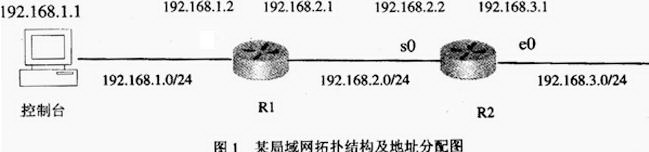
1.以下是路由器R1的部分配置命令列表:
Router>en
Router>conf term
Router (config) hostname R1
Router (config) int e0
R1 Router (config-if) (1)
R1 Router (config-if) no shutdown
R1 Router (config-if) (2)
R1 Router (config) ip routing
R1 Router (config) (3)
请为空缺处(1)、(2)、(3)添加合适的命令/参数,实现R1的正确配置。
2.以下是路由器R2的配置命令列表:
Router>en
Routerconf term
Router (config) hostname R2
R2 (config) int e0
R2 (config-if) ip address 192.168.3.1 255.255.255.0
R2 (config-if) no shutdown
R2 (config-if) int s0
R2 (config-if) ip address l92.168.2.2 255.255.255.0
R2 (config-if) no shutdown
R2 (config-if) (4)
R2 (config) ip routing
R2 (config) ip route 0.0.0.00.0.0.0 (5)
R2 (config) ip classless
R2 (config) exit
R2copy run start
请为空缺处(4)、(5)添加合适的命令/参数,实现R2的正确配置。
正确答案:(1)ip address l92.168.1.2 255.255.255.0 (2) exit (3) ip route 0.0.0.0 192.168.2.2 (4) exit (5) 192.168.2.1
(1)ip address l92.168.1.2 255.255.255.0 (2) exit (3) ip route 0.0.0.0 192.168.2.2 (4) exit (5) 192.168.2.1 解析:(1) 空缺处前面的命令为“R1 Router(config-if) #”,即该空缺处填写的配置语句用于为路由器R1的 e0接口配置IP地址信息,根据图1中的网络拓扑结构,知道路由器R1的e0接口的IP地址为“192.168.1.2”,这是一个C类IP地址,其默认的子网掩码是255.255.255.0,因此,空缺处应该填写的内容是 ip address 192.168.1.2 255.255.255.0。
(2) 根据前后的语句知道,改空缺处应该填写exit。
(3) 空缺处前面的命令为“R1 Router(config-if) #”,其作用是启动路由配置,如果没有这条命令,将导致配置的路由无效。由选项“ip router 0.0.0.0”可知,该命令用于完成某条静态路由的配置。目标地址设置为0.0.0.0,0.0.0.0表示默认路由,根据图1所示的拓扑结构可知,路由器R1到达192.168.3.0/24网段路由的下一跳地址是192.168.2.2,因此可知,空缺处所填的内容应该为ip route 0.0.0.0 192.168.2.2。
(4) 从下一条的命令提示符即可判断,输入该命令后,即从接口配置方式退回到全局模式。
(5) 路由器2的下一跳地址即对端路由器1的串口地址。
-
第16题:
图是某公司利用Intemet建立的VPN。
分部l采用DDN通过一台路由器接入Intemet。阅读下面的路由配置信息,将(1)一(3)处
标识的语句进行解释。
Router>en (进入特权模式)
Routerconfig terminal (进入全局配置模式)
Router(config)enable secret cisco (设置特权口令)
Router(config)line vty 0 4
Router(config—line)password goodbad (1)
Router(config—line)exit
Router(config)interface eth 0/0 (进入以太网接口配置模式)
Router(config—if)ip address 202.117.1.1 255.255.255.0 (设置IP地址和掩码)
Router(config—if)no shutdown (启用以太网接口)
Router(config—if)exit
Router(config)interface serialO/O (进入串口配置模式)
Router(config—if)ip address 211.175.132.10 255.255.255.252 (设置IP地址和掩码)
Router(config—if)bandwidth 256 (指定带宽为256Kbps)
Router(config—if)encapsulation PPP (2)
Router(config—if)no cdp enable (3)
Router(config—if)no shutdown (启用serial接口)
Router(config—-if)exit
Router(config)
分部1的路由器配置为ethemet0/0端口接内部网络,serialO/O端口接外部网络。下列配置指定内外网端口,完成下列配置。
Router(config—if)inter eth0/0
Router(config—if)(4)
Router(config—if)inter serial0/0
Router(config—if)(5)
Router(config—if)exit
Router(config—if)
正确答案:(1)为Telnet访问路由器设置用户模式 口令为goodbad (2)数据包设置PPP封装 (3)关闭CDP协议 (4)ip nat inside (5)ip nat outside
-
第17题:
【问题2】(3分)
根据图4-1的配置,补充完成下面路由器的配置命令:
Router(config)# interface (3)
Router(config-if)#ip address 10.10.1.1 255.255.255.0
Router(config-if)#no shutdown
Router(config-if)#exit
Router(config)# interface (4)
Router(config-if)# ip address 192.168.1.1 255.255.255.0
Router(config)# interface (5)
Router(config-if)# ip address 10.10.2.1 255.255.255.0
正确答案:【问题2】(3分)
(3)ethernet 0/0 (e0/0)
(4)ethernet 0/l (e0/1)
(5)serial0/0 (s0/0)
-
第18题:
阅读以下关于RIP动态路由配置的技术说明,结合网络拓扑图回答问题1至问题3。
[说明]
某大学城局域网的网络拓扑结构如图7-18所示,图中路由器R1、R2,R3均运行基于距离矢量算法的RIP路由协议,并且图中给出了路由器R1、R2、R3各端口的IP地址信息。
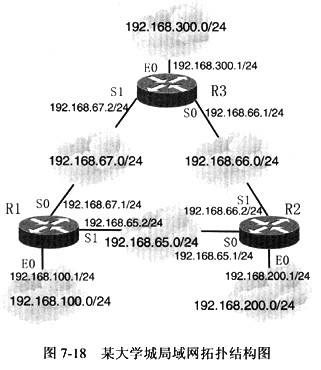
结合图7-18所示的网络拓扑结构图,将以下路由器R1配置信息中(1)~(9)空缺处的内容填写完整,实现路由器R1的正确配置。
Router>en (进入特权模式)
Router config terminal (进入配置模式)
Router (config) (1)
R1 (config) no logging console
R1 (config) interface fastethernet0/1
R1 (config-if) ip addtess 192.168.100.1 155.255.255.0
R1 (config-if) (2)
(3)
R1 (config) interface sellal 0 (进入端口S0配置子模式)
R1 (config-if) (4) (设置当前端口IP地址)
R1 (config-if) no shutdown
R1 (config-if) (5)
R1 (eonfig-if) ip address 192.168.65.2 255.255.255.0
R1 (config-if) no shutdown
R1 (config-if) exit (退出当前端口配置子模式)
R1 (config) (6)
R1 (config) (7)
R1 (config-router) (8)
R1 (conhg-router) network 192.168.65.0
R1 (config-router) network 192.168.67.0
R1 (config-router) end (退出回到特权模式)
R1 (9) (将配置信息保存到非易失性RAM中)
正确答案:(1)hostname R1(2)no shutdown (3)R1 (config-if)# exit(4)192.168.67.1 255.255.255.0 (5)interface serial 1(6)ip routing (7)router rip(8)network 192.168.100.0 (9)copy run start
(1)hostname R1(2)no shutdown (3)R1 (config-if)# exit(4)192.168.67.1 255.255.255.0 (5)interface serial 1(6)ip routing (7)router rip(8)network 192.168.100.0 (9)copy run start 解析:这是一道将RIP路由协议配置与推理填空相结合的题目。其解题思路是先粗略浏览一下网络拓扑图及路由器R1已给出的配置信息;再重点推敲试题中(1)~(9)空缺处所填写的内容。以下给出题目中路由器R1所有配置命令的完全解释,其中带下划线的配置语句为所对应空缺处的答案。
Router>enable (进入特权模式)
Router# conf terminal (进入配置模式)
Router (config) # hostname R1 (设置主机名为R1)
R1 (config) # no logging console(避免大量的端口状态变化信息、报警信息影响配置过程)
R1 (config) # interface fastethernet0/1(进入端口E0配置子模式)
R1 (config-if)# ip address 192.168.100.1 255.255.255.0
(设置E0端口IP地址)
R1 (config-if) # no shutdown(激活该端口)
R1 (config-if) # exit (退出端口配置子模式)
R1 (config) # interface serial 0(进入端口S0配置子模式)
R1 (config-if) #ip address 192.168.67.1 255.255.255.0
(设置S0端口IP地址)
R1 (config-if) # no shutdown(激活该端口)
R1 (config-if) # interface serial 1 (进入端口S1配置子模式)
R1 (config-if) # ip address 192.168.65.2 255.255.255.0
(设置S1端口IP地址)
R1 (config-if) # no shutdown(激活该端口)
R1 (config-if) # exit (退出端口配置子模式)
R1 (config) # ip routing(设置允许配置路由)
R1 (config) # router rip(进入RIP协议配置子模式)
R1 (config-router) #network 192.168.100.0 (指定与该路由器直连的网络地址信息192.168.100.0/24)
R1 (config-router) # network 192.168.65.0 (声明与该路由器直连的网络地址信息192.168.65.0/24)
R1 (config-router) # network 192.168.67.0 (声明与该路由器直连的网络地址信息192.168.67.0/24)
R1 (config-router) # end(退出回到特权模式)
R1# copy run start(将配置写入非易失性RAM中,
否则下次启动时配置参数将丢失) -
第19题:
阅读以下说明,回答问题1和问题2,将解答填入答题纸对应的解答栏内。 【说明】 某公司有3个分支机构,网络拓扑结构及地址分配如图4-1所示。

【问题1】(每空1分,共11分) 公司申请到202.111.1.0/29的公有地址段,采用NAPT技术实现公司内部访问互联网的要求,其中,192.168.16.0/22网段禁止访问互联网。 R1、R2和R3的基本配置已正确配置完成,其中R1的配置如下。请根据拓扑结构,完成下列配置代码。 R1的基本配置及NAPT配置如下: R1>enable Rlconfig tenrunal R1(config)interface fastenthemet 0/0 R1(config-if)ip address 192.168.0.1 255.255.255.252 R1(config-if)no shutdown Rl(config-if)exit R1(config)interface fastenthemet 0/1 R1(config-if)ip address 192.168.0.9 255.255.255.252 R1(config-if)no shutdown R1(config-if)exit R1(config)interface fastenthernet 0/2 R1(config-if)ip address (1) 255.255.252.0 //使用网段中最后一个地址 R1(config-if)no shutdown R1(config-if)exit R1(config)interface serial 0 R1(config-if)ip address 202.111.1.1 255.255.255.248 R1(config-if)no shutdown R1(corffig)ip nat pool ss 202.111.1.1 (2) netmask (3) R1(corffig) interface (4) fastenthernet 0/0-1 R1(config-if)ip nat (5) R1(config-if)interface serial 0 Rl(config-if)ip nat (6) R1(config-if)exit R1(config)access-Iist l permit 192.168.0.0 (7) Rl(config)ip nat inside (8) list (9) pool (10) (11) 【问题2】.(每空2分,共4分) 在R1、R2和R3之间运行OSPF路由协议,其中R1、R2和R3的配置如下。 行号 配置代码 1 R1(config)router ospf 1 2 R1(config-router)network 192.168.4.0 0.0.3.255 area 0 3 Rl(config-router)network 192.168.0.0 0.0.0.3 area 0 4 Rl(config-router)network 192.168.0.8 0.0.0.3 area 0 5 R2>enable 6 R2config terminal 7 R2(config)router ospf 2 8 R2(config-router)netvrork 192.168.8.0 0.0.3.255 area 0 9 R2 (config-router)network 192.168.12.0 0.0.3.255 area 0 1 0 R2 (config-router)network 192.168.0.4 00.0.3 area 0 1 1 R3>enable 1 2 R3config terminal 1 3 R3(config)router ospf 3 1 4 R3(config-router)netvrork 192168.0.8 00.0.3 area 0 1 5 R3(config-router)network 192.168.0.4 0.0.0.3 area 0 1.配置完成后,在R1和R2上均无法ping通R3的局域网,可能的原因是(12)。 (12)备选答案: A.在R3上未宣告局域网路由 B.以上配置中第7行和第13行配置错误 C.第1行配置错误 D.R1、R2未宣告直连路由. 2.在OSPF中重分布默认路由的命令是:(13)。 (13)备选答案: A.Rldefault-informaton originate B.R1(config-if)default-information originate C.R1(config-router)default-information originate D.Rl(config)default-information originate
正确答案:【问题1】(每空1分,共11分)
(1)192.168.7.254
(2)202.111.1.6
(3)255.255.255.248
(4)range
(5)inside
(6)outside
(7)0.0.15.255
(8)source
(9)1
(10)ss
(11)overload
【问题2】(每空2分、共4分)
(12)A
(13)C
-
第20题:
试题五(共15分)
阅读以下说明,回答问题1至问题3,将解答填入答题纸对应的解答栏内。
【说明】
某单位网络的拓扑结构示意图如图5-1所示。该网络采用RIP协议,要求在R2上使用访问控制列表禁止网络192.168.20.0/24 上的主机访问网络192.168.10.0/24,在R3上使用访问控制列表禁止网络192.168.20.0/24上的主机访问 10.10.10.0/24上的Web服务,但允许其访问其他服务器。

【问题1】(8分)
下面是路由器Rl的部分配置,请根据题目要求,完成下列配置。
......
R1(config) interace Seria10
R1config-if)ip address (1) (2)
R1(config)ip routing
R1(config) (3) (进入RIP协议配置子模式)
R1 (config-router) (4) (声明网络192.168.1.0/24)
【问题2】(3分)
下面是路由器R2的部分配置,请根据题目要求,完成下列配置。
R2 configt
R2(config) access-list 50 deny 192.168.20.0 0.0.0.255
R2(config) access-list 50 permit any
R2(config)interface (5)
R2(config-if) ip access-group (6)_ ___(7)
【问题3】(4分)
1.下面是路由器R3的部分配置,请根据题目要求,完成下列配置。
R3(confg) access-list 110 deny (8) 192.168.20.0 0.0.0.255 10.10.10.0
0.0.0.255 eq (9)
R3(config) access-list 110 permit ip any any
2.上述两条语句次序是否可以调整?简单说明理由。
正确答案:
试题五分析
本题考查路由器RIP配置及ACL配置的知识。
【问题1】
本问题考查路由器的RIP协议的配置及路由器接口地址的基本配置操作。根据题目
拓扑结构图可知,路由器Rl的SO口地址为192.168.1.1/24;所以其配置如下:
R1 (config)# interface Seria10
R1(config-if)# ip address 192.168.1.1 255.255.255.0
R1 (config) #ip routing
R1(config)# router rip(进入RIP协议配置子模式)
R1(config-router)# network 192.168.1.0(声明网络192.168.1.0/24)
【问题2】
本问题考查标准ACL的基本配置。根据题目要求,要求在R2上使用访问控制列表禁止网络192.168.20.0/24上的主机访问网络192.168.10.0/24。根据题目拓扑结构图可知,该ACL应该配置在R2的EO口上,方向为out。所以配置命令如下:
……
R2# config t
R2 (config)# access-list 50 deny 192.168.20.0 0.0.0.255
(创建ACL50 拒绝源192.168.20.0/24数据)
R2 (config)# access-list 50 permit any
R2(config)# interface fastethernet 0/0 (进入端口EO配置模式)
R2 (config-if)# ip access-group 50 out (激活ACL 50)
……
【问题3】
本问题考查扩展ACL的基本配置。
1.根据题目要求,在R3上使用访问控制列表禁止网络192.168.20.0/24上的主机访
问10.10.10.0/24上的Web服务,但允许其访问其他服务器。对于TCP和UDP协议,扩
展ACL配置命令的格式如下:
Router (config)# access-list 100-199 | 2000-2699 permit | deny tcp | udp
Source_address source_wildcard_mask [operator source_port_#]
destination_address destination_wildcard_mask[operator destination_port_#]
[established] [log]
所以,路由器R3配置如下:
……
R3(config)# access-list 110 deny tcp 192.168.20.0 0.0.0.255 10.10.0.0.0.255 eq www_
R3(config)# access-list 110 permit ip any any
2.上述两条语句次序不可以调整。因为路由器对ACL语句的处理规则如下:
·一旦发现匹配的语句,就不再处理列表中的其他语句,所以语句的排列顺序非常重要;
·如果整个列表中没有匹配的语句,则分组被丢弃。
在本例中,如果次序调整,则语句access-list 110 permit ip any any将放行所有数据,包括网络192.168.20.0/24上的主机访问10.10.10.0/24上的Web服务,这样语句access-list 110 deny tcp 192.168.20.0 0.0.0.255 10.10.10.0 0.0.0.255 eq www将失去作用。
参考答案
【问题1】
(1) 192.168.1.1 (2) 255.255.255.0 (3) routerrip
(4) network 192.168.1.0
【问题2】
(5) fastethernet 0/0(或ethernet 0/0) (6) 50(7) out
【问题3】
1.(8) tcp(9) www或80
2.不可以调整次序,acl执行顺序是自上而下,一旦次序调整后,原第一条规则失效。
-
第21题:
阅读以下说明,回答问题1~3,将解答填入对应的解答栏内。
某公司的分支机构通过一条DDN专线接入到公司总部,地址分配和拓扑结构如图5-1所示。在两台路由器之间可以使用静态路由,也可以使用动态路由。
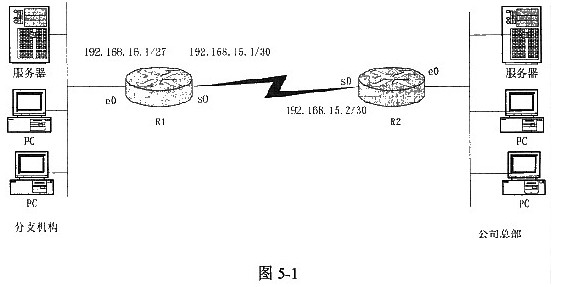
下面是分支机构路由器R1的配置命令列表,在空白处填写合适的命令/参数,实现R1的正确配置。
Router>en
Router>conf term
Router(config)hostname R1
Router(config)int e0
R1(config-if)ip address (1)
R1(config-if)no shutdown
R1(config-if)int s0
R1(config-if)ip address [ (2) ]
R1(config-if)no shutdown
R1(config-if)clock rate 56000
R1(config-if)exit
R1(config)ip routing
R1(config)ip route [ (3) ]
R1(config)ip classless
R1(config)exit
R1copy run start
正确答案:(1)192.168.15.1 255.255.255.224 (2)192.168.15.1 255.255.255.252 (3)0.0.0.0 0.0.0.0 192.168.15.2或者0.0.0.0 0.0.0.0 s0
(1)192.168.15.1 255.255.255.224 (2)192.168.15.1 255.255.255.252 (3)0.0.0.0 0.0.0.0 192.168.15.2或者0.0.0.0 0.0.0.0 s0 解析:所在命令是为R1的e0端口配置的IP地址。根据网络拓扑结构图可知,e0端口的IP地址为192.168.15.1,子网掩码长度为27,即255.255.255.224。
空(2)所在命令是为R1的s0端口配置的IP地址。根据网络拓扑结构图可知,s0端口的IP地址为192.168.15.1,子网掩码长度为30,即255.255.255.252。
空(3)所在的命令ip
route的作用是设置静态路由,由于图中并没有标有公司总部的IP地址范围,只能使用缺省路由,下一跳应为路由器R2的s0端口,因此应填写“0.0.0.0
0.0.0.0 192.168.15.2”或者“0.0.0.0 0.0.0.0 s0”。 -
第22题:
根据网络拓扑和需求说明,解释路由器R3的ISATAP隧道配置。
R3(config)#interface tunnel 0 (7)
R3(config-if) #ipv6 address 2003:DA8:8000:3::/64 eui-64为tunnel配置
IPv6地址
R3 (config-if)#no ipv6 nd suppress-ra 启用了隧道口的路由器广播
R3(config-if)#tunnel source s1/0 (8)
R3(config-if)#tunnel mode ipv6ip isatap (9)
(7)
正确答案:启用tunnel 0
启用tunnel 0 -
第23题:
下列的配置路由器不会出现提示错误的是()
- A、R1(config)#no shutdown
- B、R1(config)#interface Serial0/0/1
- C、R1(config)#ipv6 route fec0:dddd:/64Serial0/0/1
- D、R1(config)#ipv6 route fec0:bbbb:/64
正确答案:B,C