
设计电子商务网站时,某页面框架代码如下: <frameset rows="80,*" cols="*" frameborder="NO" border="0" framespacing="0"> <frame. src="banner. htm" name="topFrame" scrolling="NO" noresize> <frameset cols="80,*" frameborder="NO" border="0" framespacing="0"> <frame. src="left",htm
题目
设计电子商务网站时,某页面框架代码如下: <frameset rows="80,*" cols="*" frameborder="NO" border="0" framespacing="0"> <frame. src="banner. htm" name="topFrame" scrolling="NO" noresize> <frameset cols="80,*" frameborder="NO" border="0" framespacing="0"> <frame. src="left",htm" name="leftFrame" scrolling="NO" noresize> <frame. src="main.htm" name="mainFrame"> </frameset> </frameset> 该网页中定义了(64)个框架。
A.1
B.2
C.3
D.4
相似考题
参考答案和解析
解析:本题考查页面框架代码的基本知识。frameset rows="80,*" cols="*" frameborder="NO" border="0" framespacing="0">将窗口横向分割成两部分,上半部分高度为80个像素;其余分配各下半部分。frame. src="banner,htm" name="topFrame" scrolling="NO" noresize>横向定义上半部分中的网页名称。frameset cols="80,*" frameborder="NO" border="0" framespacing="0">将下半部分再垂直分为两部分,左半部分宽度为80个像素;其余分配各右半部分。
更多“设计电子商务网站时,某页面框架代码如下: <frameset rows="80,*" cols="*" frameborder="NO" border="0" framespacing="0"> <frame. src="banner. htm" name="topFrame" scrolling="NO" noresize> <frameset cols="80,*" frameborder="NO" border="0" framespacing="0"> <frame. src="left",htm”相关问题
-
第1题:
请根据网页显示的效果图(见图6-3)和网页中的元素说明回答问题。
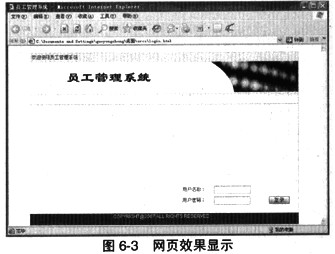
以下是网页部分源代码,请填写______ 处的空格。
<html>
<head>
(1)
<meta. http-equiv="Content-Type" content="text/html; charset=gb2312">
<link hrel="./inc/style.css" rel="stylesheet" type="text/css">
<style. type="text/css"><!-- body { margin-left: Opx; margin-top: Opx; margin-right: Opx; margin-bottom: Opx;}
.style1 { font-family: Arial, Helvetica, sans-serif; color: FFFFFF; }
.style2 {color: FFFFFF}
--></style>
</head>
<body>
<br>
<table width="700" height="420" border="0" align="center" cellpadding="0"cellspacing="1" bgoolor="dddddd">
<tr>
<td valign="top"><table width="700" height="420" border="0" cellpading="0" cellspacing="0" bgcolor="ffff">
<tr>
<td valign="top"><table width="700" border="0" cellpadding="5" cellspacing="0" bgcolor="f1f1f1">
<tr><td>欢迎使用员工管理系统</td></tr>
</table>
<table width="700" height="80" border="0" cellpadding="0" cellspacing="0">
<tr>
<td><(2)="./images/logotitle. gif" width="700" height="80"></td>
</tr>
</table>
<table width="700" height="38" border="0" cellpadding="0" cellspacing="0" background="./images/bg_link.gif">
<tr><td> </td></tr>
</table>
<table width="700" border="0" cellspacing="0" cellpadding="0">
<tr>
<td height="280"><IMG height="80" src="./images/logo. gif" width="389"></td>
<td valigr="bottom">
<form. method="post" name="Form. 1"(3)="login. asp">
<table width="300" border="0" cellspacing ="0" cellpadding="3">
<tr>
<td>用户名称: </td>
<td><input name="uid" maxlength="14" size="14" ></td>
<td>&nisp;</td>
<td> </td>
</tr>
<tr>
<td>用户密码: </td>
<td><input type="(4)"name="pwd" maxlength="6" size="14"></td>
<td> </td>
<td><input type="(5)"border="0" height="20" src="./images/login.gif" width:"54"></td>
</tr>
(6)
正确答案:(1)title>员工管理系统/title> (2)IMG src (3)action (4)password (5)image (6)/table>
(1)title>员工管理系统/title> (2)IMG src (3)action (4)password (5)image (6)/table> 解析:在head>和/head>之间的内容,是head信息。Head信息是不显示出来的,在浏览器中看不到。但是这并不表示这些信息没有用处。比如,可以在head信息中加上一些关键词,这有助于搜索引擎能够搜索到网页。
在title>和/title>之间的内容,是这个文件的标题。你可以在浏览器最顶端的标题栏看到这个标题。在body>和/body>之间的信息,是正文。从页面预览效果来看,此处代码需要显示在浏览器的标题栏,因此,需使用title标记:
title>员工管理系统/title>
(2)从网画页预览效果给出的部分代码来看,此处是显示一个logotitle.gif的图片。在 HTML中,常使用IMG nClick=over(this) title=放大>这个标记来插入图片。最基本的语法如下:
IMG nClick=over(this) title=放大 src="url">
url表示图片的路径和文件名 。比如url可以是“http://www.csai.cn/images/logo/csai_logo01.gif”,也可以是个相对路径“../images/logo/ csai_ logo01.gif”。因此,第二空为IMG nClick=over(this) title=放大 src。
(3)表单(form)是HTML的一个重要部分,主要用于采集和提交用户输入的信息。举个简单的例子,一个让用户输入姓名的表单的示例代码如下:
form. action="../html/csai.asp" meihod="get">
请输入你的姓名:
input type="text" name="yourname">
input type="submit" value="提交">
/form>
关于表单,我们要掌握的知识点主要有以下三个:
. 表单控件:通过HTML表单的各种控件,用户可以输入文字信息,或者从选项中选择,以及做提交的操作。比如,在上面的例子中,“input type="text"”就是一个表单控件,表示一个单行输入框。
. action:用户填入表单的信息总是需要程序来进行处理,表单里的action就指明了处理表单信息的文件。比如,上面例子中的“../html/csai.asp”表示将用csai. asp程序来处理表单信息。
. method:表示发送表单信息的方式。method有两个值,分别是get和post。get的方式是将表单控件的name/value信息经过编码之后,通过URL发送(可以在地址栏里看到);而post则将表单的内容通过HTTP发送(在地址栏看不到表单的提交信息)。一般来说,如果只是为取得和显示数据,用get;一旦涉及数据的保存和更新,那么用post。
通过上面分析,很显然,第(3)空处应该是action。
从网页预览效果给出的部分代码来看,此处是两个表单控件,分别是密码输入框与图片提交框。HTML表常用控件如表6-4所示。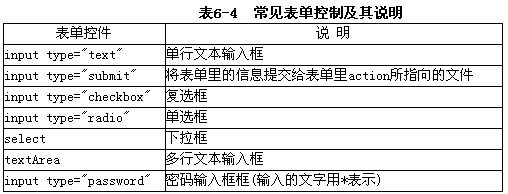
. 密码输入框(input type="password")。密码输入框主要用于一些保密信息的输入。因为用户输入的时候,显示的不是输入的内容,而是黑点符号。例句如下:
input type="password" name="yourpw">
. 提交按钮(input type="submit")。通过提交可以将表单里的信息提交给表单中 action所指向的文件。例句如下:
input type="submit" value="提交">
. 图片提交(input type="image")。input type=image相当于input type=submit,
不同的是,input type=image以一个图片作为表单的提交按钮,其中src属性表示图片的路径。
input type="image"src="../images/icons/go.gif"> alt="提交" name="IMG nClick=over(this) title=放大submit".>
因此;(4)处为:password;(5)处为image。(6)从代码中不难观察出,table>表格标签还缺少一个结束标记/table>。HTML表格用table>表示。一个表格可以分成很多行(row),用tr>表示;每行又可以分成很多单元格(cell),用td>表示。这三个标记是创建表格最常用的标记,起始标记与结束标记必须成对出现。表格标签示例如下:
html>
body>
h4>两行三列的表格/h4>
table border="1">
tr>
td>100/td>
td>200/td>
td>300/td>
/tr>
tr>
td>400/td>
td>500/td>
td>600/td>
/tr>
/table>
/body>
/html>
表格预览效果如图6-9所示。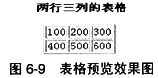
-
第2题:
试题五(共15分)
阅读下列说明,根据网页显示的效果图,回答问题1至问题2。
【说明 】
某电子商务网站如图5-1所示。
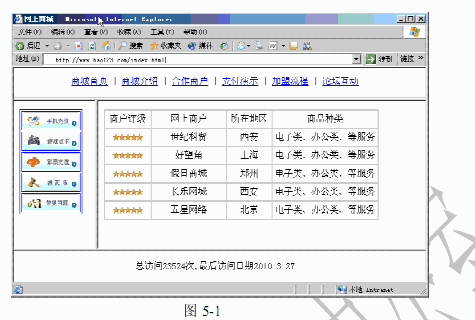
【index.html 文档的内容 文档的内容 文档的内容 文档的内容】
<html>
<head>
<title>网上商城</title>
</head>
<frameset (1)="15%,70%,15%" noresize="noresize" border=1
<frame. src="frame_top.html" name="top">
<frameset (2)="20%,80%">
<frame. src="frame_left.html" name="left">
<frame. src="frame_right.html" name="right">
</frameset>
<frame. src="count.asp" name="bottom">
</frameset>
</html>
【frame_left.html 文档的内容】
<html>
省略部分代码……
<center>
<table border="1" bordercolor="blue">
<tr>
<td><a href="content_1.html" (3)="right">
<img src="img/1.gif" width="100" height="30" border="0"></a></td>
</tr>
省略部分代码……
</table>
</center>
省略部分代码……
</html>
【count.asp 文档的内容 文档的内容 文档的内容 文档的内容】
<html>
<head>
<title>计数器</title>
<body>
<%
Set conn=Server.CreateObject("ADODB.Connection")
Set rs=Server.CreateObject("ADODB.(4)")
conn.ConnectionString="(5)={Microsoft Access Driver (*.mdb)};Uid=;Pwd=;DBQ=
"&Server. (6) ("database/count.mdb")
conn.open()
(7) sql
sql="(8) count set hit=hit+1"
conn.(9)(sql)%>
sql = "select * from count"
set rs=conn.execute(sql)
%>
<%
lasthit=rs.fields("lasthit")
tdate=year(Now()) & "-" & month(Now()) & "-" & day(Now())
sql="update count set lasthit='" &tdate&"' where ID="&rs.fields("id")
conn.execute(sql)
%>
<%
sql = "select * from count"
set rs=conn.execute(sql)
%>
<table bgcolor=blue><tr><td width="100%" align=center>总访问<%=rs("hit")%>次,最后访问
日期<%=rs("lasthit")%></td></tr></table>
<%
rs.close()
%>
</body>
</html>
【问题1】(6 分)
为程序中(1)~(3)处空缺选择正确答案,并填入答题纸对应的解答栏内。
(1)~(3)备选答案:
A. src
B. cols
C. rows
D. target
E. link
正确答案:C,B,D
问题1(每空2分,共6分)1,C或rows2,B或cols3,D或target -
第3题:
有以下HTML代码,在浏览器中显示正确的是( )。
<html>
<frameset rows="25%,50%,25%">
<frame. src="/html/frame_A.html">
<frame. src="/html/frame_B.html">
<frame. src="/html/frame_C.html">
</frameset>
</html>
 正确答案:B
-
第4题:
● 设计电子商务网站时,某页面框架代码如下:
<frameset rows="80,*" cols="*" frameborder="NO" border="0" framespacing="0">
<frame. src="banner.htm" name="topFrame" scrolling="NO" noresize >
<frameset cols="80,*" frameborder="NO" border="0" framespacing="0">
<frame. src="left.htm" name="leftFrame" scrolling="NO" noresize>
<frame. src="main.htm" name="mainFrame">
</frameset>
</frameset>
该网页中定义了 (64) 个框架。
(64)
A.1
B.2
C.3
D.4
正确答案:C
-
第5题:
以下是某网页框架设置的部分代码,该代码将页面分成了______个区域。<frameset cols="30%,*,*"><frame src='f1.html"name=main><frameset rows="120,*"><frame src='f2.html"name=left>…</frameset></frameset>A.2
B.3
C.4
D.5答案:C解析:本题考查HTML框架的基础知识。在HTML中使用frameset标记可以将浏览器窗口划分成若干区域,在这些区域中可以分别显示不同的页面。frameset标记有多个参数,其中cols参数可以垂直切割浏览器窗口,例如cols="30%,*,*"将窗口垂直分割为三个部分。rows参数可以横向切割窗口,例如rows="120,*"将窗口水平分割为两个部分。使用时cols与rows两个参数尽量不要同在一个<frameset>标记中,尽量采用多重分割方式。在本题中,浏览器窗口首先被<frameset cols="30%,*,*">分为垂直的三个窗口,其中一个窗口中,又被<frameset rows="120,*">分割为两个窗口,所以该代码将页面窗口分成了4个区域。 -
第6题:
框架中“可改变大小”的语法是下列哪一项()
- A、<IMG SRC="URL" BORDER=?>
- B、<SAMP></SAMP>
- C、<ADDRESS></ADDRESS>
- D、<FRAME NORESIZE>
正确答案:A -
第7题:
加入一条水平线的HTML代码是?()
- A、<hr>
- B、<img src="name" border=?>
- C、<img src="name" align=?>
- D、<img src="name">
正确答案:A -
第8题:
实现左上,右上圆角,左下和右下直角以下写法正确的是()。
- A、border-radius:0px 0px 5px 5px
- B、border-top-left-radius:5px;border-top-right-radius:5px;
- C、border-left-top-radius:5px;boder-right-top-radius:5px;
- D、border-radius:5px 5px 0px 0px;
正确答案:B,D -
第9题:
设置表格的边框为0的HTML代码是()
- A、<table cellspacing =0>
- B、<table height=0>
- C、<table border=0>
- D、<table cellpadding =0>
正确答案:C -
第10题:
看下述文件 < html> < head> < /head> < frameset cols="50%,*"> < frame name="hello" src="b.htm"> < frame name="hi" src="c.htm"> < /frameset> < /html> 下面说明正确的是()
- A、 src="c.htm"是设定此框窗中要显示的网页档案,每个框窗一定要对应一个网页档案。
- B、 src="c.htm"是设定此框窗中要显示的网页档案属性
- C、 标记宣告HTML文件为框架模式,并设定视窗如何分割
- D、 标记宣告HTML文件为表格模式,并设定视窗如何分割
正确答案:A,C -
第11题:
加入一条水平线的HTML代码是?()
- A、<hr>
- B、<img src="name"border=?>
- C、<img src="name"align=?>
- D、<img src="name">
正确答案:A -
第12题:
( 难度:中等)加入一条最大标题的HTML代码是?
A.<h1>
B.<img src="name" border=0>
C.<img src="name" align=center>
D.<img src="name">
答案:A -
第13题:
下面代码中为横向排列多个窗口的是( )。
A.<frameset cols=20%,*> <frame. src="A.html"> <framesetrows=30%,50%*> <frame. src="B.html"> <frame. src="C.html"> </frameset> </frameset>
B.<frameset cols=30%,70%> <frame. src="A.html"> <frame. src="B.html"> </frameset>
C.<frameset rows=25%,75%> <frame. src="A.html"> <frame. src="B.html"> </frameset>
D.<frameset rows=20%,*> <frame. src="A.html"> <frameset cols=30%,50%*> <frame. src="B.html"> <frame. src="C.html"> </frameset> </frameset>
正确答案:C
-
第14题:
阅读下列说明,回答问题1至问题2,将解答填入答题纸的对应栏内。
【说明】
某学生信息管理系统的网站后台管理主页如图4-1所示。

【问题1】(7分) 以下是该管理系统后台管理主页部分的html代码,请根据图4-1,从以下备选答案内为程序中(1)~(7)处空缺部分选择正确答案 <html> <head> <title> (1) <title> </head> <% if (2) ("admin")="" then (3) .Redirect ("login.asp") (4) %> <frameset (5) ="71,*" framespacing="0" border="O" frameborder="O"> <frame (6) ="heaD.asp" scrolling="no" name="head" noresize> <frameset (7) ="152,*"> <frame src="menu.asp"> <frame src="main.asp" name="main" scrolling="yes" noresize> </frameset> </frameset> …… </html> (1)~(7)的备选答案: A.cols B.else C.Rows n D.response E. Src F. session G. 设为首页 H. 后台管理 【问题2】(8分) 以下是该管理系统学生信息录入页面部分的html代码,请根据图4-1,从以下备选答案内为程序中(8)~(15)处空缺部分选择正确答案。 <html> …… <script language="JavaScript"> (8) check() { if(formA. (9) .value=="") { alert("请输入学生姓名!"); formA.name_xs.focus(); retum (10) ; } …… retum (11) ; } </script> …… <form action=" " method="post" (12) ="return check();"> <table"> <tr> <td heigh=21" colspan="2">[<strong>添加学生信息</strong>] <font color="OOOOFF"></font></td> </tr> <tr> <td width="19%" height="20">学生姓名:</td> <td width="81%"><input name="name_xs" type=" (13) "id="name_cnxdb" onkeydown="next()"></td> </tr> …… <tr align="center"> <td><input type=" (14) " value="增加"> <input type=" (15) "value="重写"></td> …… <html> (8)~(15)的备选答案: A.false B.Function C.name_xs D.onsubmit E. true F. reset G. submit H. text
正确答案:【问题1】(7分)(1)H(2)F(3)D(4)B(5)C(6)E(7)A【问题2】(8分)(8)B(9)C(10)A(11)E(12)D(13)H(14)G(15)F
-
第15题:
●试题五
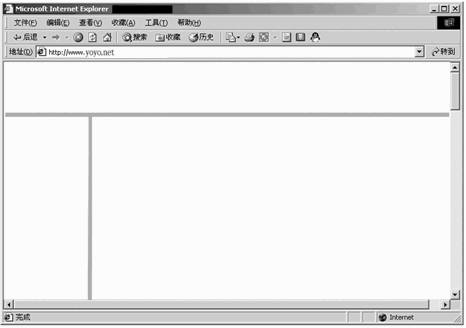
阅读下列说明和HTML文本。在HTML文本中存在5处错误,请指出并给出改正的方法。[说明]这是一个简单的HTML文本,描述了框架结构,显示效果如图所示。
【HTML文本】
(1) <html>
(2) <head>
(3) <title>框架测试</title>
(4) </head>
(5) <meta. name="GENERATOR"content="Microsoft FrontPage 4.0">
(6) <frameset rows="64,*1">
(7) <frame. name="banner"scrolling="no"target="contents"src="header.htm">
(8) <frame. name="contents"target="list"src="list.htm">
(9) <frameset cols="150,*">
(10) <frame. name="main"src="context.htm">
(11) </frameset>
(12) </frameset>
(13) <noframes>
(14) <body><p>此网页使用了框架。</body>
(15) </noframes>
(16) </html>
图显示效果图
正确答案:
●试题五【答案】(1)第(5)行位置不正确。<meta>标签必须位于<head>与</head>标签之间。(2)第(8)行不正确。<frame>的target属性中指定的框架"list"在文本中没有定义,可以改为banner、contenls或main中的任何—个。(3)第(9)行位置不正确。根据图像分析,框架结构应该为上左右型,而本例为左右下型,应将(8)(9)行互调。(4)第(13)(14)(15)行位置不正确。<noframes>与</noframes>应位于<frameset>与</frameset>之间。(5)第(14)行不正确。<p>与</p>应该成对出现,在文字与</body>之间应添加</p>。【解析】本题主要考查考生对HTML文档和框架网页的结构的掌握情况。HTML是用于设计网页的一种超文本标记语言(HyperTextMarkupLanguange),它包含了网页制作所需元素的非常丰富的标记符,用户只要选择适当的标记符,并设置其相应的属性,就可以设计出较为完善的网页。在应用HTML文档设计网页时,应注意以下问题。HTML文档的结构要正确。容器标记的结构要正确,比如框架网页、表单和表格等。注意标记符的嵌套关系。注意开始标记与结束标记的配套。正确应用各个标记符的属性。本题主要涉及有关HTML文档和框架网页的结构问题,下面仅就这两部分做简单介绍。一个HTML文档分别以<HTML>、</HTML>为开始和结束,它是HTNIL文档的标志,<HTML>和</HTML>之间的部分一般分为头部分和体部分,分别由<HEAD×/HEAD>和<BODY></BODY>两个标记符分开。<HEAD>和</HEAD>之间只包括少数几个标记符,如浏览器窗口标记符<TITLE></TITLE>和文档属性标记符<META>等;<BODY>和</BODY>之间包含大量的标记符,如<FONT>和<P><P>等。HTML文档的一般结构如下。<HTML><HEAD><TITLE>这里是网页的标题,显示在浏览器的标题栏中</TITLE><META.name=特性名http—equiv=HTTP的响应名称content=特性值><BGSOUNDsrc=背景音乐文件名loop=重复次数></HEAD><BODY>这里是页面上显示的内容,是网页的主要部分。<!--这里是注释语句--></BODY></HTML><FRAMESET>标记符是一个框架容器,它可以将窗口分成若干个长方形的子区间,即框架。在框架网页的HTML文档中,<FRAMESET>标记符紧跟在<HEAD>标记符后。<FRAMESET>标记符可包含—个或多个<FRAME>标记符,<FRAME>的个数是由<FRAMESET>中参数的个数决定的,例如<FRAMESETrows="64,*">,意味着<FRAMEST>标记符一定包含两个<FRAME>标记符。通常<FRAMESET>中的属性rows和cols不同时使用,如果要设计既有列框架又有行框架的网页,通常是采用<FRAMESET>的嵌套来实现的。<FRAMESET>中还可能包含一个可选的<NOFRAMES>标记符。其作用是,当浏览器不支持或禁用<FRAME>时,<NOFRAMES>标记符将提供替换的浏览内容。框架网页的HTML文档的一般结构如下。<HTML><HEAD><TITLE>框架结构<个ITLE><HEAD><FRAMESETrows="64,*"><FRAME.name:"banner",scr=header.htm'><FRAMESETcols="64.*"><FRAME><FRAME></FRAMESET><FRAME><NOFRAMES><BODY><P>此网页使用了框架,但您的浏览器不支持框架。<IP></BODY></NOFRAMES></FRAMESET></HTML> -
第16题:
● 以下是某网页框架设置的部分代码,该代码将页面分成了 (61)个区域。
<frameset cols="30%,*,*">
<frame. src='f1.html" name=main>
……
<frameset rows="120,*">
<frame. src='f2.html" name=left>
……
</frameset>
</frameset>
(61)
A. 2
B. 3
C. 4
D. 5
正确答案:C
-
第17题:
表示显示框架的HTML的代码是()
- A、<frameset frameborder=yes>
- B、<frame frameborder=yes>
- C、<frame border=yes>
- D、<frameset border=yes>
正确答案:B -
第18题:
< frameset cols=# >,.表示()
- A、框架的行高
- B、框架的行数
- C、框架的列高
- D、框架的列数
正确答案:C -
第19题:
〈frameset cols="80,*"〉是用来指定()框架结构方式。
- A、左右结构
- B、上下结构
- C、前后结构
正确答案:A -
第20题:
给图片加边框正确的写法是()。
- A、<img src="" border="blod"/>
- B、<img src="" width="1"/>
- C、<img src="" height="1"/>
- D、<img src="" border="1"/>
正确答案:D -
第21题:
显示框架空白区域的HTML代码是()
- A、<frame framespacing=#>
- B、<frameset framespadding=#>
- C、<frameset framespacing=#>
- D、<frame framespadding=#>
正确答案:C -
第22题:
框架中“禁止改变框架窗口大小”的语法是()
- A、<a href="right.html" target="rightframe">
- B、<IMG src="URL" border=?>
- C、<FRAMESET rows="20%,*" frameborder="0">
- D、<FRAME noresize>
正确答案:D -
第23题:
单选题如果一次还本付息债券按单利计息,按复利贴现,其内在价值决定公式为( )。A<IMG style="FILTER: ; WIDTH: 161px; HEIGHT: 39px" height=39 alt="" hspace=0 src="https://static.tiw.cn//files/201202/20120222172336171.jpg" width=161 border=0>
B<IMG style="FILTER: ; WIDTH: 148px; HEIGHT: 39px" height=39 alt="" hspace=0 src="https://static.tiw.cn//files/201202/20120222172344780.jpg" width=148 border=0>
C<IMG style="FILTER: ; WIDTH: 136px; HEIGHT: 38px" height=38 alt="" hspace=0 src="https://static.tiw.cn//files/201202/20120222172350368.jpg" width=136 border=0>
D<IMG style="FILTER: ; WIDTH: 136px; HEIGHT: 41px" height=41 alt="" hspace=0 src="https://static.tiw.cn//files/201202/20120222172358505.jpg" width=136 border=0>
正确答案: B解析: 暂无解析