
A:根据对话内容从方框内所给的选项中选出最佳答案,使对话完整,符合逻辑,句义通顺。注意:有多余选项。A: Excuse me, 81B: Yes, and you are……?A: 82 . This is my membership card. Would you please show me your passport?B: OK. 83A: Welcome to Beijing, Miss White. I am so glad that you are the first guest I have
题目
A:根据对话内容从方框内所给的选项中选出最佳答案,使对话完整,符合逻辑,句义通顺。注意:有多余选项。
A: Excuse me, 81
B: Yes, and you are……?
A: 82 . This is my membership card. Would you please show me your passport?
B: OK. 83
A: Welcome to Beijing, Miss White. I am so glad that you are the first guest I have received.
B: Thank you, Miss Chen. 84
A: Let me help you with your suitcase. Our car is waiting for us just at the entrance. 85
B: Thank you very much for your good service.
A: It’s a pleasure.
81.__________
A. Who are you?
B. I’m an English guide from Beijing China Travel Service.
C. Here you are.
D. Are you Miss White from New York?
E. I’m so lucky that I could meet my guide as soon as I got off the plane.
F. Can you help me?
G. It will take us to the hotel.
相似考题
更多“A:根据对话内容从方框内所给的选项中选出最佳答案,使对话完整,符合逻辑,句义通顺。注意:有多余选 ”相关问题
-
第1题:
在Windows的对话框中,有一组复选框选项,根据需要( )。A、可以选一项或多项
B、必须选多项
C、仅能选一项
D、必须全选
答案:A
-
第2题:
如果希望按拼音首字母排序,可以在排序对话框内的()中完成。A、次序
B、选项
C、添加条件
D、筛选
答案:B
-
第3题:
B:根据对话内容填入适当的单词补全对话,使句义完整,符合逻辑,每空限填一个单词。
A: 86 in the room?
B: There are some kinds of robots made by the students in our school.
A: Really? What are they 87 for?
B: The one with blue eyes is a guide robot. She can show you around our school.
A: 88 about the taller one?
B: He is a cook robot. He can cook something nice for you.
A: Oh, I think that’s a cleaning robot.
B: Maybe you’re right. When he finds waste things, he’ll pick them up. He can 89 our environment clean.
A: That’s wonderful! What good students! I’m proud of them.
B: So 90 I.
86.___________
正确答案:
what’s -
第4题:
请从所给的四个选项中,选出最恰当的一项填入问号处,使之呈现一定的规律性。 答案:A解析:元素组成不同, 且无明显属性规律, 考虑数量规律。 观察发现, 题干中出现了许多三角形的面, 图一为一个三角形的面, 图二为两个三角形的面, 图三为三个三角形的面, 图四内部补上一根线条即为四个三角形的面,图五内部补上两根线条即为五个三角形的面, 所以? 处应为补上线条为六个三角形的面。 只有 A 项内部补上两根线条, 正好构成六个三角形。
 -
第5题:
从所给的四个选项中,选出最合适的一个填入问号处,使之呈现一定的规律性:
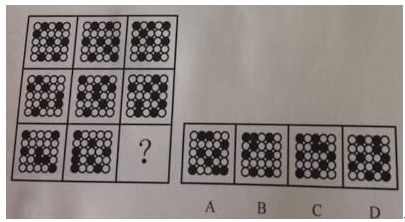 答案:C解析:数量类加静态位置。九宫格横行寻找规律。每一行三幅图形黑点的个数分别为7、8、9个,所以先排除B选项。然后观察静态位置,第一行三幅图形的小黑点都是相离排布,没有连在一起的,第二行都有两个小黑点连在一起,第三行都有三个小黑点连在一起,所以答案选择C。
 -
第6题:
请从所给的四个选项中,选出最符合左边的四个图形一致性规律的选项。( )
A.A B. B C. C D. D答案:A解析:从前4个图可知线段数从6个减为3个,依次少一个,故答案为A。 -
第7题:
从所给的四个选项中,选出一个填在问号处,使之呈现一定的规律性:
 答案:B解析:B [解析]本题属于样式类,考查的是困形的对称性。观察可知,題干中的五个图形 既是轴对称图形,又是中心对称图形,且有横轴和纵轴两条对称轴。四个选项中只有B项符 合此规律,正确答案为B。
 -
第8题:
在EXCEL中“数据排序”的“选项”对话框内容包括()。
- A、区分大小写
- B、排序方向
- C、排序方法
- D、排序次序
正确答案:A,B,C -
第9题:
在字体对话框中的“大小”列表框内可以设置字号。
正确答案:正确 -
第10题:
按拼音首字母排序在“排序”对话框内的()中完成。
- A、次序
- B、选项
- C、添加条件
- D、筛选
正确答案:B -
第11题:
多选题在EXCEL中“数据排序”的“选项”对话框内容包括()。A区分大小写
B排序方向
C排序方法
D排序次序
正确答案: A,D解析: 暂无解析 -
第12题:
单选题从哪里可找到用于更改表格单元格边距的选项?()A“页面设置”对话框(从“文件”菜单中打开)
B在“单元格选项”和“表格选项”对话框中
C在“表格属性”对话框的“单元格”选项卡上
正确答案: B解析: 表格中的每个单元格都好像是其自己的一个页面,每个单元格都有上边距、下边距、左边距和右边距。
在“表格选项”对话框中更改整个表格的单元格边距。在“表格”菜单上,单击“表格属性”,然后单击“表格”选项卡上的“选项”按钮。 -
第13题:
点击软件首页的新建项目,下列选项不属于对话框内容的是()。A、项目样板
B、新建项目
C、新建项目样板
D、新建族
答案:D
-
第14题:
第一节 听下面5段对话,每段对话后有一个小题,从题中所给的A、B、C三个选项中选出最佳选项,并标在试卷的相应位置,听完每段对话后,你都有10秒钟的时间来回答有关小题的阅读下一小题,每段对话仅读一遍。
1、What will Dorothy do on the weekend?
A Go out with her friend
B work on her paper
C Make some plans
正确答案:B
-
第15题:
请从所给的四个选项中,选出最符合左边五个图形一致性规律的选项: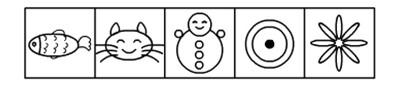
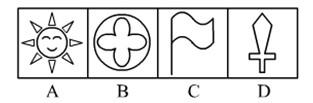 答案:B解析:【思路点拨】这是一道图形构成元素特征规律题。题目当中的五个给出图,并不存在图形构成数量、种类等方面的规律,五个图形在构成元素方面具备的唯一共同特征,是它们都是由曲线构成的,图形当中不存在直线。
选项当中只有B选项是由曲线构成的,A、C、D三个选项的图形中都含有直线。故应选择B选项。 -
第16题:
请从所给的四个选项中,选出最符合左边五个图形一致性规律的选项:(第一章用)

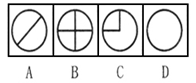 答案:D解析:无论题干中是怎样的图形,都没有将圆分割开,只有D满足这样的规律。
 -
第17题:
请从所给的四个选项中,选出最符合左边四个图形一致性规律的选项。( )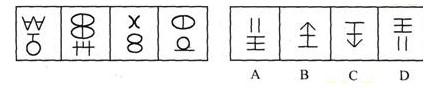
A.A B. B C. C D. D答案:D解析:左图的上半部分分别代表A、B、C、D,下半部分依次代表5,4,3,2,故答案为D。 -
第18题:
请从所给的四个选项中,选出最符合左边四个图形一致性规律的选项。 答案:D解析:前四个图形有两个特点:一是都是大图形中套小图形,二是小图形有部分与大图形相重合,由此观察选项,只有D符合。
 -
第19题:
使用CUSTOMIZE命令打开“自定义”对话框,以下关于该对话框,错误的说法是()
- A、对话框左边,“选项板”框中的内容不能添加
- B、对话框右边的“选项板组”框中的内容可以添加
- C、可以将对话框左边“选项板”框中的内容拖动到右边“选项板组”框中
- D、可以将右边的“选项板板组”输出为 XPG 文件
正确答案:A -
第20题:
从哪里可找到用于更改表格单元格边距的选项?()
- A、“页面设置”对话框(从“文件”菜单中打开)
- B、在“单元格选项”和“表格选项”对话框中
- C、在“表格属性”对话框的“单元格”选项卡上
正确答案:B -
第21题:
在“造词”对话框中,列表框内不会显示任何词语。
正确答案:错误 -
第22题:
单选题从所给的四个选项中,选出符合左边五个图形规律的一项。( )AA
BB
CC
DD
正确答案: C解析:
题中图形依次为封闭图形——开放图形——封闭图形——开放图形——封闭图形,依此规律,即所选图形应该是开放图形,因此答案选C。 -
第23题:
单选题使用CUSTOMIZE命令打开“自定义”对话框,以下关于该对话框,错误的说法是()A对话框左边,“选项板”框中的内容不能添加
B对话框右边的“选项板组”框中的内容可以添加
C可以将对话框左边“选项板”框中的内容拖动到右边“选项板组”框中
D可以将右边的“选项板板组”输出为 XPG 文件
正确答案: C解析: 暂无解析