
单选题在JAVA语言中,下列语句()可以画出一矩形框架,其距上边界为10,宽为30像素,高为40象素A Graphics g=new Craphics(); g.drawRect(10,0,30,40);B Graphics g=new Craphics(); g.drawRect(0,10,30, 40);C Graphics g=new Craphics(); g.drawRect(30,40,10, 0);D Graphics g=new Craphics(); g.drawRect
题目
Graphics g=new Craphics(); g.drawRect(10,0,30,40);
Graphics g=new Craphics(); g.drawRect(0,10,30, 40);
Graphics g=new Craphics(); g.drawRect(30,40,10, 0);
Graphics g=new Craphics(); g.drawRect(30,40,0,10);
相似考题
更多“单选题在JAVA语言中,下列语句()可以画出一矩形框架,其距上边界为10,宽为30像素,高为40象素A Graphics g=new Craphics(); g.drawRect(10,0,30,40);B Graphics g=new Craphics(); g.drawRect(0,10,30, 40);C Graphics g=new Craphics(); g.drawRect(30,40,10, 0);D Graphics g=new Craphics(); g.drawRect”相关问题
-
第1题:
阅读以下应用说明、图和Java代码,根据要求回答问题1至问题5。
【说明】
Stack类是java. ntil包中专门用来实现栈的工具类。以下Java程序是一个不使用库函数而实现字符串反转的程序。例如,输入:123456,则输出:654321:输入:asdfeg,则输出:gefdsa。
【Java程序】
import java.applet.Applet;
import java.awt.*;
import java.awt.event.*;
import java.util.*;
public class UseStack extends Applet implements ActionListener
{ Stack MyStack;
Label prompt=new Label("输入要反转字符:");
Button pushBtn=new Button("压栈");
Button popBtn=new Button("弹栈"); //反转
TextField input=new TextField(5);
int[] DrawStack =new int[10]; //记录堆栈中数据
int[] PoppedOut=new int[20]; //记录被弹出的数据
int StackCnt=0; //记录模拟堆栈的数组中的数据个数
String msg=" ";
public void init()
{ MyStack=new Stack();
add(prompt);
add(input);
add(pushBtn);
add(popBtn);
pushBtn.addActionListener(this);
(1)
}
public void paint(Graphics g)
{ for (int i=10; i<StackCnt; i++) //模拟显示堆栈内部的数据排列情况
{ g.drawRect(50,200-i*20,80,20);
g.drawString(Integer.toString(DrawStack[i]),80,215-i*20);
}
for (int i=0;(2) ) //显示被弹出的数据
g.drawString(Integer.toString(PoppedOut[i]),200+i*20,100);
g.drawString("堆栈",70,236);
g.drawString("栈底",135,225);
g.drawString("栈顶",160,225-StackCnt*20);
g.drawString(msg,200,140);
}
public void actionPerformed( (3) )
{ if (e.getAct ionCommand () == "压栈") //压栈操作
{ if(StackCnt<10)
{ MyStack.push(new Integer( (4) ));
DrawStack[StackCnt++]=Integer.parseInt(input.getText() );
input.setText (" ");
}
else
msg="输入数据过多,请先弹栈!"
}
else if (e.getActionCommand () == "弹栈") //弹栈操作
{ if( (5) )
{ StackCnt--;
PoppedOut[PopCnt++]=[(Integer)(MyStack.pop())).intValue();
}
else
msg="堆栈已空,不能再弹栈!";
}
repaint();
}
}
正确答案:(1)popBtn.addActionListener(this); (2)iPopCnt;i++或其等价语句 (3)ActionEvente (4)input.getText() (5)!MyStack.empty()或其等价语句
(1)popBtn.addActionListener(this); (2)iPopCnt;i++或其等价语句 (3)ActionEvente (4)input.getText() (5)!MyStack.empty()或其等价语句 解析:这是一道要求读者掌握Java中Stack类工具应用的程序设计题。本题的解答思路如下。
堆栈简称为栈,遵循“后进先出(LIFO)”原则。Stack是Java用来实现栈的工具类,它的主要方法如表2-16所示。本试题的Java程序是使用Stack类实现堆栈中弹栈和压栈的操作。
对于本试题,Java程序中使用输入区域input来接收用户输入的数据,并用pushBtn按钮对应的操作将该数据压入堆栈,使用popBtn按钮对应的操作将数据从栈顶弹出,所以要随时监听这两个按钮是否有操作。程序中已给出了监听pushBut按钮是否有操作的语句“pushBut.addActionListener(this);”,同理可得,要随时监听popBut按钮是否有操作,则(1)空缺处所填写的弹栈按钮监听语句是“popBtn.addAction Listener(this);”。
本Java程序为了显示堆栈中数据排列的情况和数据弹出的情况,还定义了两个一维数组DrawStaek[]和PoppedOut[]分别记录堆栈中的数据和被弹出的数据。由于程序中己给出PopCnt是用来“记录模拟堆栈的数组中被弹H1的数据个数”等注释信息,而(2)空缺处所在的循环体是用来显示被弹出的数据。因此(2)空缺处所填写的内容是“iPopCnt;i++”。
(3)空缺处所填写的内容用于设置监听操作,应填写“ActionEvent e”。
在使用压栈、弹栈操作时,压入堆栈和弹出堆栈的都是object对象或是。object子类的对象,而不是基本数据类型的数据。通常一个堆栈里可以保存不同类的对象,而本Java程序堆栈中保存的都是Integer类的对象。在压栈操作中,(4)空缺处要获取压入栈的数据,因此该空缺处应填入“input.getText()”。
在弹栈操作中,(5)空缺处用于判断栈是否为空,若不为空,才能进行弹栈操作,因此该空缺处所填写的判断条件是“!MyStack.empty()”。 -
第2题:
下列Applet使用drawLine()方法绘制矩形,左上角坐标为(20,40),长为60,宽为 40。请选择正确的语句填入横线处。 import java.awt.*; import java.applet.*; public class ex32 extends Applet { public void paint(Graphics g) { g.setColor(Color.blue); g.drawLine(20, 40, 80, 40); ______ g.drawLine(20, 80, 80, 80); g.drawLine(20, 80, 20, 40); } }
A.g.drawLme(80, 40, 80, 80);
B.drawLine(40, 40, 80, 80);
C.g.drawLine(80, 20, 80, 80);
D.drawLine(80, 40, 80, 80);
正确答案:A
-
第3题:
关于下面程序段的说法,正确的是 import java.applet.*; import java.awt.*; public class Test extends Applet{ Image IMG nClick=over(this) title=放大; public void init(){ IMG nClick=over(this) title=放大=new Image(); } public void paint(Graphics g){ g.drawImage(IMG nClick=over(this) title=放大,0,0,this); } }
A.该程序段可以正常运行
B.程序中所创建的Image为空,但可以显示
C.程序中所创建的Image不为空
D.程序中所创建的Image为空,不能显示
正确答案:D
解析:本题考查Image的概念和用法。程序的目的是想要使用drawImage(Image img,int x,int y,ImageObserver observer)方法将img在 Applet中画出,但由于程序段所创建的Image为空,不能显示,应该先调用getImage()获取已经存在的图像。所以选项D正确。 -
第4题:
下列Applet实现了使用灰度值递减的顺序显示0~9,选择正确的语句填入横线处。 import java.applet.*; import java.awt.*; import java.awt.Color; public class ex24 extends Applet { public void paint(Graphics g) { int r = 0, g1 = 0, b = 0, j = 10; for(int i - 0; i < 10; i ++) { g.setColor(new Color(r, g1, b)); r += 25; g1 +=25; b +=25; j += 10; } } }
A.g.drawString(i, j, 30);
B.g.drawString("" + i, j, 30);
C.drawString(i,j, 30);
D.drawstring("" + i,j, 30);
正确答案:B
-
第5题:
在JAVA语言中,下列语句()可以画出一矩形框架,其距上边界为10,宽为30像素,高为40象素
- A、Graphics g=new Craphics(); g.drawRect(10,0,30,40);
- B、Graphics g=new Craphics(); g.drawRect(0,10,30, 40);
- C、Graphics g=new Craphics(); g.drawRect(30,40,10, 0);
- D、Graphics g=new Craphics(); g.drawRect(30,40,0,10);
正确答案:B -
第6题:
在g.drawRect(15,18,300,20)的语句中,()代表矩形的宽度和高度。
- A、15,18
- B、18,300
- C、300,20
- D、20,15
正确答案:C -
第7题:
You are the administrator of Company’s network. Your Windows 2000 Professional computer has a removable disk device installed. The device can use storage modules of varying sizes. You use these storage modules to transfer graphics files between your location and a printing company. The printing company uses Windows 98. You insert a new 1 GB disk device into your computer and format the new disk device as NTFS with the default options. You then place large graphics files on the disk device and deliver it to the printing company. The printing company reports that they are unable to access the files. You want the printing company to be able to access the graphics files on the new disk device. What should you do? ()
- A、Format the new disk device as FAT16 with a 128 KB cluster size.
- B、Format the new disk device as FAT32 with a 4 KB cluster size.
- C、Format the new disk device as NTFS with a 4 KB cluster size.
- D、Format the new disk device as NTFS with a 8 KB cluster size.
正确答案:B -
第8题:
You are the administrator of ExamSheet.net's network. Your Windows 2000 Professional computer has a removable disk device installed. The device can use storage modules of varying sizes. You use these storage modules to transfer graphics files between your location and a printing company. The printing company uses Windows 98. You insert a new 100 MB disk device into your computer and format the new disk device as NTFS with the default options. You then place large graphics files on the disk device and deliver it to the printing company. The printing company reports that they are unable to access the files. You want the printing company to be able to access the graphics files on the new disk device. What should you do?()
- A、Format the new disk device as NTFS with a 4 KB cluster size.
- B、Format the new disk device as FAT32 with a 4 KB cluster size.
- C、Format the new disk device as FAT32 with a 1 KB cluster size.
- D、Format the new disk device as FAT16 with a 4 KB cluster size.
正确答案:D -
第9题:
单选题在JAVA语言中,下列语句()可以画出一矩形框架,其距上边界为10,宽为30像素,高为40象素AGraphics g=new Craphics(); g.drawRect(10,0,30,40);
BGraphics g=new Craphics(); g.drawRect(0,10,30, 40);
CGraphics g=new Craphics(); g.drawRect(30,40,10, 0);
DGraphics g=new Craphics(); g.drawRect(30,40,0,10);
正确答案: D解析: 暂无解析 -
第10题:
单选题在Java语言中,使我们能够使用和更改字体来显示或者键入文本的类()AJava.awt.Font
BJava.awt.Graphics.Font
CJava.Graphics.Font
DJava.Font
正确答案: A解析: 暂无解析 -
第11题:
单选题Microsoft’s newly developed software has a new feature ______ user to include graphics in a presentation.Ademonstrating
Bconcerning
Cpreventing
Dallowing
正确答案: D解析:
句意:微软公司新研发的软件的新功能是它能使用户把图形加入演示报告。此处为allow sb. to do sth.句型,意为“允许某人做某事”。 -
第12题:
单选题You are the administrator of ExamSheet.net's network. Your Windows 2000 Professional computer has a removable disk device installed. The device can use storage modules of varying sizes. You use these storage modules to transfer graphics files between your location and a printing company. The printing company uses Windows 98. You insert a new 100 MB disk device into your computer and format the new disk device as NTFS with the default options. You then place large graphics files on the disk device and deliver it to the printing company. The printing company reports that they are unable to access the files. You want the printing company to be able to access the graphics files on the new disk device. What should you do?()AFormat the new disk device as NTFS with a 4 KB cluster size.
BFormat the new disk device as FAT32 with a 4 KB cluster size.
CFormat the new disk device as FAT32 with a 1 KB cluster size.
DFormat the new disk device as FAT16 with a 4 KB cluster size.
正确答案: A解析: 暂无解析 -
第13题:
本题中,鼠标在窗口中单击一下,就在单击的位置生成一个小矩形,如果在小矩形上双击鼠标左键,则删除小矩形。 import java.awt.*; import java.awt.event.*; import javax swing.*; class MousePanel extends JPanel extends MouseMo- tionListener {public MousePanel {addMouseListener(new MouseAdapter {public void mousePressed(MouseEvent evt) {int X=evt.getX; int Y=evt.getY; current=find(x,y); if(current<0) add(x,y); } public void mouseClicked(MouseEvent evt) {int X=evt.getX; int Y=evt.getY; if(evt.getClickCount>=2) {remove(current); } } }); addMouseMotionListener(this); } public void paintComponent(Graphics g) {super.paintComponent; for(int i=0;i<nsquares;i++) draw(g,i); } public int find(int X,int y) (for(int i=0;i<nsquares;i++) if(squares[i].x-SQUARELENGTH/2<= x X<=squares[i].x+SQuARELENGTH/2 squares[i].Y-SQUARELENGTH/2< =Y y<=squares[i].Y+SQUARELENGTH /2) return i ; return-1 ; } public void draw(Graphics g,int i) {g.drawRect(squares[i].X-SQUARE- LENGTH/2。 squares[i].Y-SQUARELENGTH/2, SQUARELENGTH, SQUARELENGTH); } public void add(int X,int Y) {if(nsquares<MAXNSQUARES) {squares[nsquares]=new Point(x,y); current=nsquares ; nsquares++; repaint; } } public void remove(int n) {if(n<0 ‖ n>=nsquares)return; Nsquares- -; squares[n]=squares[nsquares]; if(current= =n)current= -l; repaint; } public void mouseMoved(MouseEvent evt) {} public void mouseDragged(MouseEvent evt) {} private static final int SQUARELENGTH=10: private static final int MAXNSQUARES=100; private Point[]squares=new Point[MAX- NSQUARES]; private int nsquares=0; private int current=-l; } class MouseFrame. extends JFramc {public MouseFrame {setTitle("java3"); setSize(300,200); addWindowListener(new WindowAdapter {public void windowClosing(WindowEvent e) {System.exit(0); } }); Container contentPane=getContentPane; contentPane.add(MousePanel); } } public class java3 {public static void main(String[]args) {JFrame. frame=new MouseFrame; frame.show; } }
正确答案:
第l处:extends JPanel implements MouseMotionListener.
第2处:super.paintComponent(g)
第3处:contentPane.add(new MousePanel)
【解析】第1处是继承Jpanel实现鼠标移动监听器接口;第2处以g为参数重新绘制组件;第3处在contentPane内容面板中添加一个MousePanel鼠标面板。 -
第14题:
请将下面的Applet程序补充完整。
import java. awt. *;
import java. applet. *;
public class Hi【 】{
public void paint(Graphics g){
g. drawString("Hi!", 25, 25);
}
}
正确答案:【 】extends Applet
【 】extends Applet 解析:所有用户新建的Applet类都必须继承自Applet基类。因为Applet基类已经具有很多性质并实现一些公有方法,也只有继承Applet,我们的新类才能称之为Applet并嵌入网页中运行。 -
第15题:
下面是一个Applet程序,程序的功能是用鼠标画图。本题是通过单击鼠标后画出一个Java字。请改正程序中的错误(有下划线的语句),使程序能输出正确的结果。
注意;不改动程序的结构,不得增行或减行。
源程序文件代码清单如下;
import java.awt.*;
import java.awt.event.*;
import java.applet.*;
/*
<applet code=SimpleHitMouse.java width=800 height=400>
</applet>
*/
public class SimpleHitMouse implements Applet
{
private java.util.Vector points=new java.util.Vector();
public void init()
{
addMouseListener(new MouseAdapter()
{
public void mousePressed(MouseEvent e)
{
points.add(new Point(e.getX(),e.getY())
paint();
}
}
public void update(Graphics g)
repaint(g);
}
public void paint(Graphics g)
{
for(int i=0;i<points.size();i++)
{
Point dot=(Point)points.elementAt(i);
g.drawString("x",dot.x,dot.y);
}
}
public static void main(String args[ ])
{
Frame. fram=new Frame("CelayTree");
SimpleHitMouse dot=new SimpleHitMouse();
dot.init ();
dot.start ();
fram.add ( "Center", dot );
fram.setSize( 400,300 );
fram.addWindowListener( new WindowAdapter(){
public void windowClosing( WindowEvent e )
{
System.exit(0);
}
});
fram.show ();
}
}
ex12_3.html:
<html>
<head>
<title>A Simple Program</title>
</head>
<body>
<applet code=" SimpleHitMouse.class" width=800 height=400>
</applet>
</body>
</html>
正确答案:extends repaint() paint(g)
extends repaint() paint(g) 解析:本题主要考查Java Applet程序的编写、Java程序事件处理机制。解答本题的关键是熟练掌握Java Applet程序的编写和 Java程序事件处理机制的知识。编写Applet小程序必须要用到java.appelt包中的Applet类java.applet.Applet,java.awt.Panel的子类。在Applet中,Applet的显示更新是由一个专门的AWT线程控制的。与Applet显示相关的3个方法:④paint()方法,Applet的paint()方法具体执行Applet的绘制,该方法的定义为public void paint(Graphics g),参数g是 Graphics类的实例,该实例对象由浏览器生成,它包含了Applet的图形上下文信息,通过它向Applet中显示信息,该对象相当于 Applet的画笔:②update()方法,该方法的定义为public void update(Graphics g),update()方法用于更新Applet的显示,该方法将首先清除背景,再调用paint()方法完成Applet的具体绘制;③repain()方法,repaint()方法的定义为public void repaint(),该方法主要用于 Applet的重新显示,它调用update()方法实现对Applet的更新。在本题中,extends关键字用于继承父类,repaint()、paint()方法都用于Applet的重新显示。程序的运行结果如下。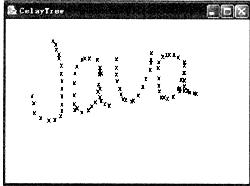
-
第16题:
本题的功能是求两个交叉图形的并、减、交和异或。窗口中有4个单选按钮和一个图形面板,面板中有两个交叉的图形,选中其中一个单选按钮,图形面板中以黑色填充的方式显示运算结果。
import java.awt.*;
import java.awt.event*+;
import java.awt.geom.*;
import java.util.*;
import javax.swing.*;
public class java3
{
public static void main(String[]args)
{
JFrame. frame=new AreaTestFrame();
frame.setDefaultCloseOperation(JFrame.EXIT_
ON_CLOSE);
frame.show();
}
}
class AreaTestFrame. extends JFrame
{
public AreaTestFrame()
{
setTitle("java3");
setSize(WIDTH,HEIGHT);
areal
=new Area(new Ellipse2D.Double(100,100,
150,100));
area2
=new Area(new Rectangle2D.Double(150,150,
150,100));
Container confentPane=getContentpane();
panel=new
JPanel()
{
public void paintComponent(Graphics g)
{
super.paintComponent(g);
Graphics2D g2=(Graphics2D)g;
g2.draw(areal);
g2.draw(area2);
if(area!=null)g2.fill(area);
}
};
contentPane. add(panel,BorderLayout. CEN-
TER);
JPanel buttonPanel=new JPanel();
ButtonGroup group=new ButtonGroup();
JRadioButton addButton=new JRadioButton("
并",false);
buttonPanel.add(addButton);
group.add(addButton);
addButton.addActionListener(new
ActionListener()
{
public void actionPerformed(ActionEvent event)
{
area=new Area();
area.add(areal);
area.add(area2);
panel.repaint();
}
});
JRadioButton subtractButton
=new JRadioButton("减",false);
buttonPanel.add(subtractButton);
group.add(subtractButton);
subtractButton.addActionListener(new
ActionListener()
{
public void actionPerformed(ActionEvent event)
{
area=new Area();
area.add(areal);
area.subTract(area2);
panel.repaint();
}
});
JRadioButton intersectButton
=new JRadioButton("交",false);
buttonPanel.add(intersectButton);
group.add(intersectButton);
intersectButton.addActionListener(new
ActionListener()
{
public void actionPerformed(ActionEvent event)
{
area=new Area():
area.add(areal);
area.intersect(area2);
panel.repaint();
}
});
JRadioButton exclusiveCIrButton
=new JRadioButton(“异或”,false);
buttonPanel.add(exelusiveOrButton);
group.add(exclusiveOrButton);
exclusiveOrButton.addActionListener(new
ActionListener()
{
public void actionPerformed(ActionEvent event)
{
area=new Area();
area.add(areal);
area.exclusiveor(area2);
panel.repaint();
}
});
contentPane.add(buttonPanel,BorderLayout.
NORTH);
}
private JPanel panel;
private Area area;
private Area areal;
private Area area2;
private static final int WIDTH=400;
private static final int HEIGHT=400;
}
正确答案:
第1处:ContainercontentPane=getContentPane()第2处:area.subtract(area2)第3处:area.exclusiveor(area2)【解析】第1处用getContentPane()获得内容面板;第2处表示从area形状中减去area2形状;第3处将area设置为area形状和area2形状的组合,并减去相交部分。 -
第17题:
import java.awt.*; import java.applet.*; pulic class DrawRect extends Applet { Public void paint(Graphics g) { g.setColor(Color.red); g.drawRoundRect(150,50,50,50,20,40); g.setColor(Color.green); g.fillRoundRect(150,140,50,50,20,20); } } 根据代码,输出结果正确的有()。
- A、两个圆角矩形的绘制弧高都为20
- B、两个圆角矩形的绘制弧宽相同
- C、两个圆角矩形是左对齐的
- D、两个圆角矩形是上对齐的
正确答案:A,D -
第18题:
A technician has just installed an upgraded graphics card. The computers power turns off before itfinishes booting. Which of the following is the cause of the problem? ()
- A、The monitor cannot display the increased resolution that is a feature of the new graphics card.
- B、The power supply does not provide enough wattage to power the new graphics card.
- C、The new graphics card is incompatible with the existing processor.
- D、The computer does not have enough RAM to support the new graphics card.
正确答案:B -
第19题:
You have a computer that runs Windows XP Professional. You replace the video graphics adapter in the computer and restart the computer. You discover that the hardware acceleration features of the video graphics card fail to function. You verify that the new video graphics adapter is certified for Windows XP Professional. You need to ensure that the hardware acceleration features of the video card function. What should you do?()
- A、At the command prompt, run sigverif.exe.
- B、Install the most up-to-date driver for the video graphics adapter.
- C、Restart the computer in Safe Mode. Copy a new version of the vga.dll file to the computer.
- D、Restart the computer in VGA Mode. Copy a new version of the vga.dll file to the computer.
正确答案:B -
第20题:
单选题在Java语言中,使我们能够使用和更改字体来显示或键入文本的类是()。AJava.awt.Font
BJava.awt.Graphics.Font
CJava.Graphics.Font
DJava.Font
正确答案: A解析: 暂无解析 -
第21题:
单选题A technician has just installed an upgraded graphics card. The computers power turns off before itfinishes booting. Which of the following is the cause of the problem? ()AThe monitor cannot display the increased resolution that is a feature of the new graphics card.
BThe power supply does not provide enough wattage to power the new graphics card.
CThe new graphics card is incompatible with the existing processor.
DThe computer does not have enough RAM to support the new graphics card.
正确答案: C解析: 暂无解析 -
第22题:
单选题You are the administrator of Company’s network. Your Windows 2000 Professional computer has a removable disk device installed. The device can use storage modules of varying sizes. You use these storage modules to transfer graphics files between your location and a printing company. The printing company uses Windows 98. You insert a new 1 GB disk device into your computer and format the new disk device as NTFS with the default options. You then place large graphics files on the disk device and deliver it to the printing company. The printing company reports that they are unable to access the files. You want the printing company to be able to access the graphics files on the new disk device. What should you do? ()AFormat the new disk device as FAT16 with a 128 KB cluster size.
BFormat the new disk device as FAT32 with a 4 KB cluster size.
CFormat the new disk device as NTFS with a 4 KB cluster size.
DFormat the new disk device as NTFS with a 8 KB cluster size.
正确答案: A解析: 暂无解析 -
第23题:
单选题在g.drawRect(15,18,300,20)的语句中,()代表矩形的宽度和高度。A15,18
B18,300
C300,20
D20,15
正确答案: C解析: 暂无解析 -
第24题:
单选题You have a computer that runs Windows XP Professional. You replace the video graphics adapter in the computer and restart the computer. You discover that the hardware acceleration features of the video graphics card fail to function. You verify that the new video graphics adapter is certified for Windows XP Professional. You need to ensure that the hardware acceleration features of the video card function. What should you do?()AAt the command prompt, run sigverif.exe.
BInstall the most up-to-date driver for the video graphics adapter.
CRestart the computer in Safe Mode. Copy a new version of the vga.dll file to the computer.
DRestart the computer in VGA Mode. Copy a new version of the vga.dll file to the computer.
正确答案: C解析: 暂无解析